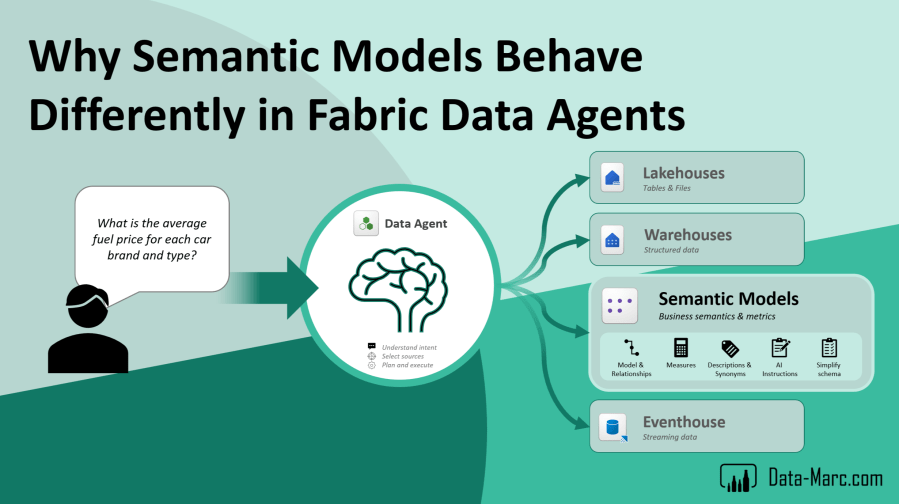
By now, we’ve all heard something about Fabric Data Agents, or maybe under their previous name: AI Skills. The promise is compelling. Ask questions in natural language and get answers directly from your data inside Microsoft Fabric.
What makes Fabric Data Agents particularly interesting is the wide range of supported data sources. Today, Data Agents can connect to nearly everything that lives inside Microsoft Fabric, or data that is linked into Fabric through shortcuts. Whether your data sits in a Lakehouse, Warehouse, KQL Database, Power BI semantic model, or even external storage connected through OneLake shortcuts.
However, the way Data Agents handle sources can differ significantly from one source type to another. Semantic Models in particular behave quite differently compared to other Fabric data sources. In this blog, I’ll dive deeper into how prompt handling works for Semantic Models, what happens behind the scenes, and the common gotchas you’re likely to encounter along the way.
Very short intro to Data Agents
For those of you who are not yet familiar with Fabric Data Agents, let’s do a very quick refresher first. If you already know the basics, feel free to skip ahead to the next section.
Data Agents, previously known as AI Skills, are General Available in Microsoft Fabric and were part of the Data Science workload for a long time. A Data Agent connects to one or multiple data sources inside Fabric and uses AI to interpret prompts, retrieve relevant information, and return responses in a conversational way. The goal is to make data more accessible for both technical and non-technical users.
Nowadays, it’s also strongly positioned in the Fabric IQ layer as one of the options to add (business) context to your data. Data Agents are seen Microsoft Fabric’s built-in AI capability that allows users to interact with data using natural language. At a high level, a Data Agent acts as an intelligent layer on top of your Fabric data estate. It understands the available data sources, interprets the user’s prompt, determines which data is relevant, generates the required queries behind the scenes, and returns the answer in a conversational format.
A key difference compared to the built-in Copilot capabilities in Microsoft Fabric is the level of control and flexibility Data Agents provide. While Copilot typically operates within a single context and reasons over one data source at a time, Data Agents give authors much more control over the interaction. With Data Agents, you can steer the conversation, define the response style, and shape how answers are presented to the user. More importantly, they can reason across multiple data sources in a single experience. This means a Data Agent can combine and query data from different sources such as semantic models, lakehouses, warehouses, eventhouses, or any other connected Fabric sources. Instead of being limited to one dataset at a time, you can build experiences that bring multiple data domains together in one conversational flow.
How Data Agents work
Before we dive into source handling and specifically semantic models, we first have to understand how Data Agents work. From an end-user perspective, the experience feels very straightforward:
- The answer is returned in natural language
- Ask a question
- The Data Agent interprets the request
- Queries are generated and executed automatically
- Answer is returned to the user
However, behind this simplicity sits quite a bit of complexity. The way a Data Agent retrieves information heavily depends on the underlying source type. A Warehouse behaves differently from a Lakehouse, and Semantic Models introduce yet another layer of abstraction and interpretation. Understanding these differences is essential when you want to build reliable AI-driven analytics experiences inside Fabric.
At the time of writing this blog (May 2026), the following list of data sources are supported for Data Agents:
- Lakehouse (schema enabled and non-schema enabled)
- Warehouse
- Semantic Model
- Eventhouse
- Mirrored DB
- Fabric SQL DB
- AI Search
- Fabric IQ (Ontologies)
But to simplify, we could say that any source lives in Fabric or is linked to Fabric through Shortcuts. Also, we could state that we identify three different languages that Data Agents uses to interact with the sources.
- Natural Language to SQL (NL2SQL)
- Natural Language to DAX (NL2DAX)
- Natural Language to Kusto Query Language (NL2KQL)
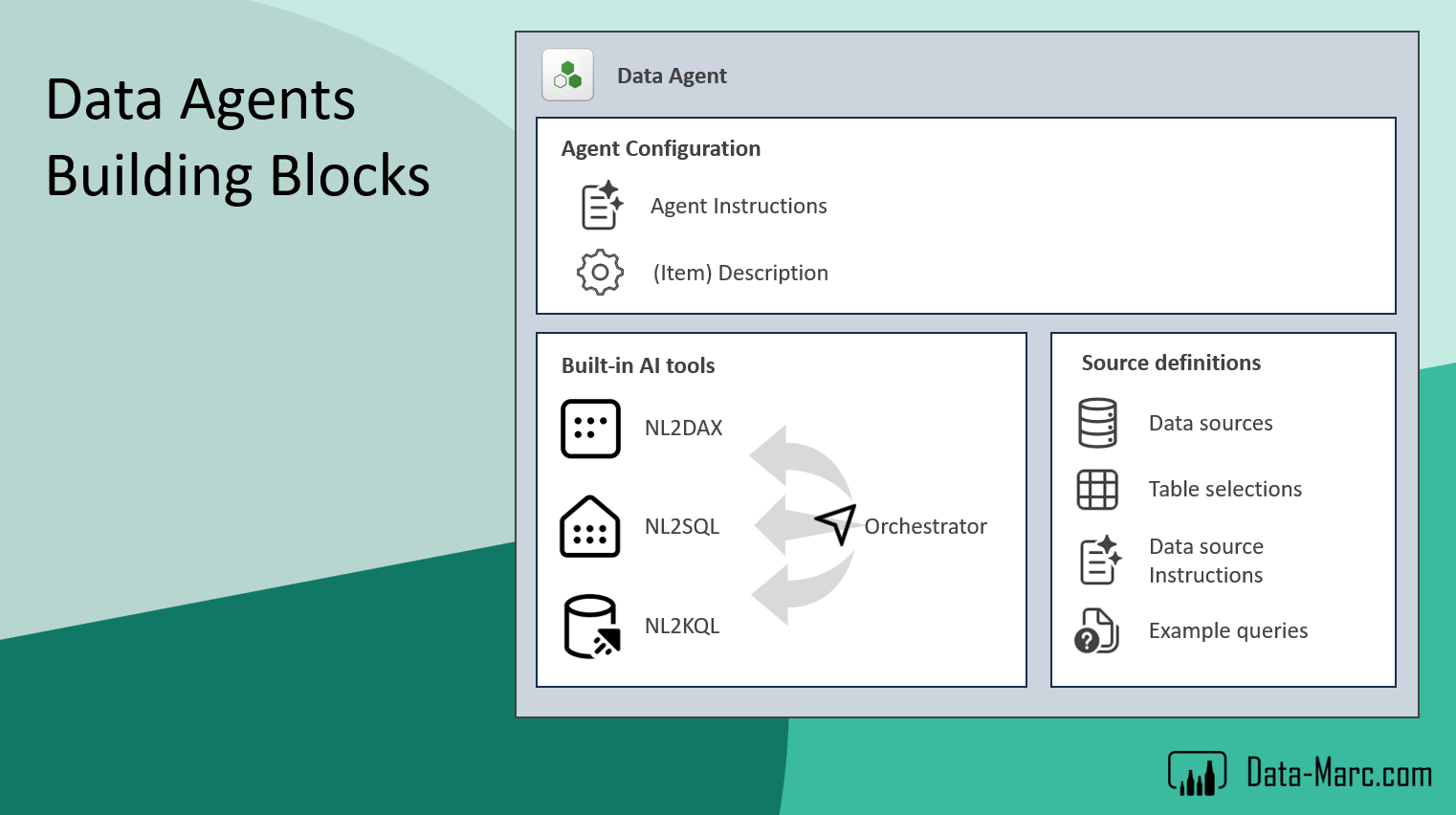
In order to make the Data Agent operate and return accurate answers, the author has several tools (building blocks) to add context to the Data Agent, as well as make it behave the right way, select the right source at the time and add data related context such as how certain tables relate together. In general, this starts with the Agent Instructions where most context will be added about the Agent behavior, business context and query plans. This section is where the author can add markdown text.
Next, is the source definitions. These source definitions include the different connected data sources for the Data Agent amongst table selections, as not all tables from a source have to be included in the Agent response. Also, data source specific instructions can be added such as how tables are related (relationships), key columns and maybe even mapping from technical names to user friendly names (synonyms) as typically Lakehouses and Warehouses may have technical names coming from the data platform. Lastly, example queries per source allow authors to add complex queries as example which the Agent can use as source of inspiration to answer complex questions. Note: this behavior is quite different when it comes to Semantic Models. More about that further down.
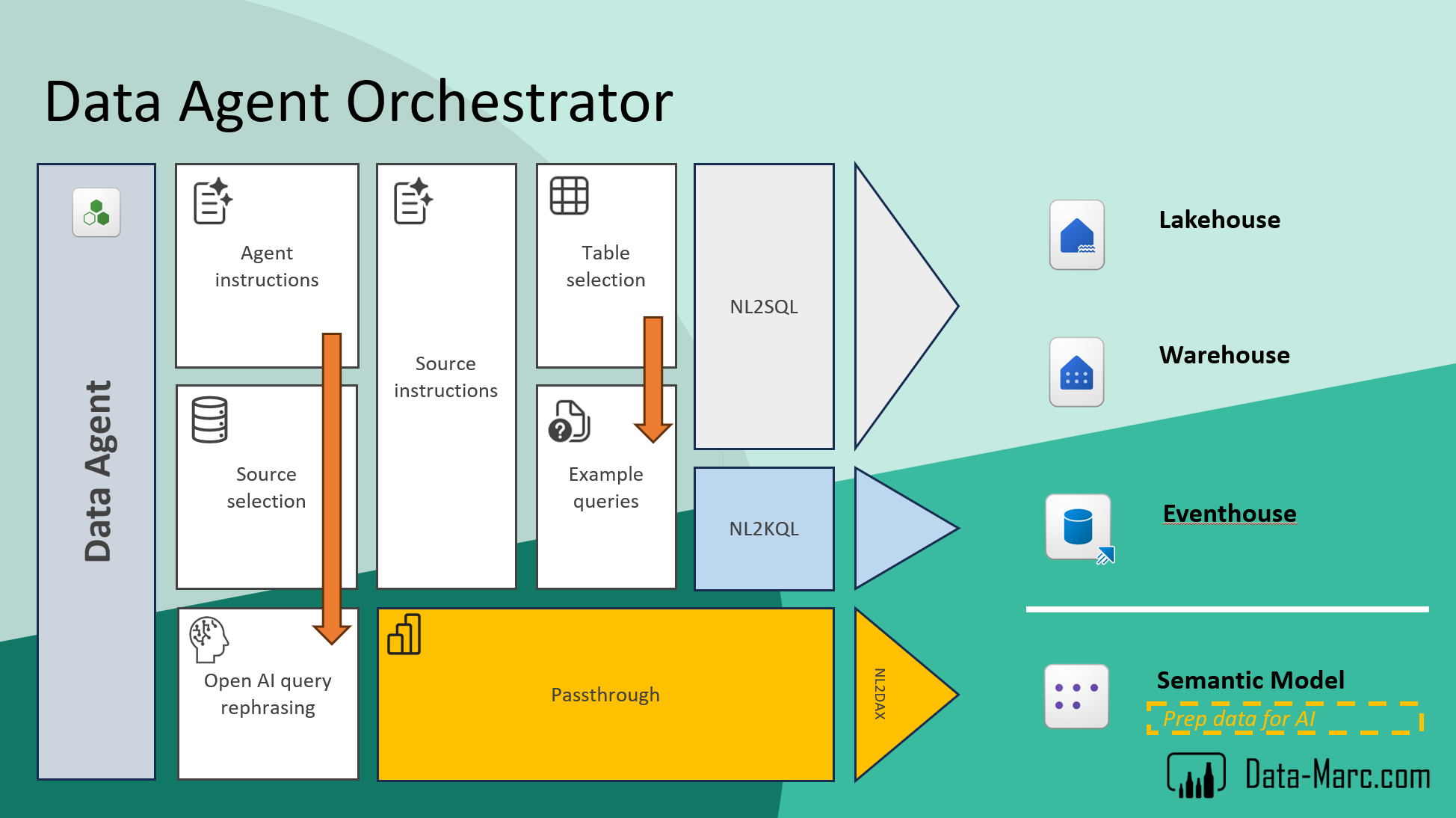
Based on all this information, the Data Agent Orchestrator determines how to route the request. It evaluates the user’s question, the available connected sources, and the context provided by the agent configuration. From there, it decides which data source is most appropriate to answer the question and how the response should be constructed.
This includes selecting whether a query should be executed against a Semantic Model, a Lakehouse, a Warehouse, or another connected Fabric source. At the same time, the orchestrator also influences how the answer is expressed back to the user, ensuring the response aligns with the expected format, structure, and level of detail defined by the agent.
In essence, the orchestrator acts as the control layer between the user’s natural language prompt and the underlying data landscape, translating intent into the most suitable execution path and response style.
Semantic Models behave differently
The overall flow may look fairly straightforward, which is also what we typically see with other natural language to query patterns such as NL2SQL or NL2KQL. In those cases, the system translates the user’s question into a query against a relatively direct data structure and returns the result.
The orchestrator in Data Agents follows a defined sequence of steps that can vary depending on the selected data source. The process starts on the left side, where a business user submits a prompt to the Data Agent. From there, the first layer that comes into play is the Agent Instructions. These instructions help interpret the user’s intent and provide general guidance on how the agent should behave. Based on this interpretation, the orchestrator then performs source selection and prompt rephrasing.
During this phase, the original user prompt is enriched with additional context. The rephrasing step is particularly important, as it helps expand the prompt with relevant surrounding information, making the intent clearer and more structured for downstream processing. This enriched prompt is then used as the basis for selecting the most appropriate data source and generating the final response.
If the source selection determines that the appropriate data source to answer the question is a Lakehouse, Warehouse or Eventhouse, then additional configuration elements become relevant. In these cases, components such as Source Instructions, Table Selections and Example Queries are used to further guide how the Data Agent interacts with the underlying data.
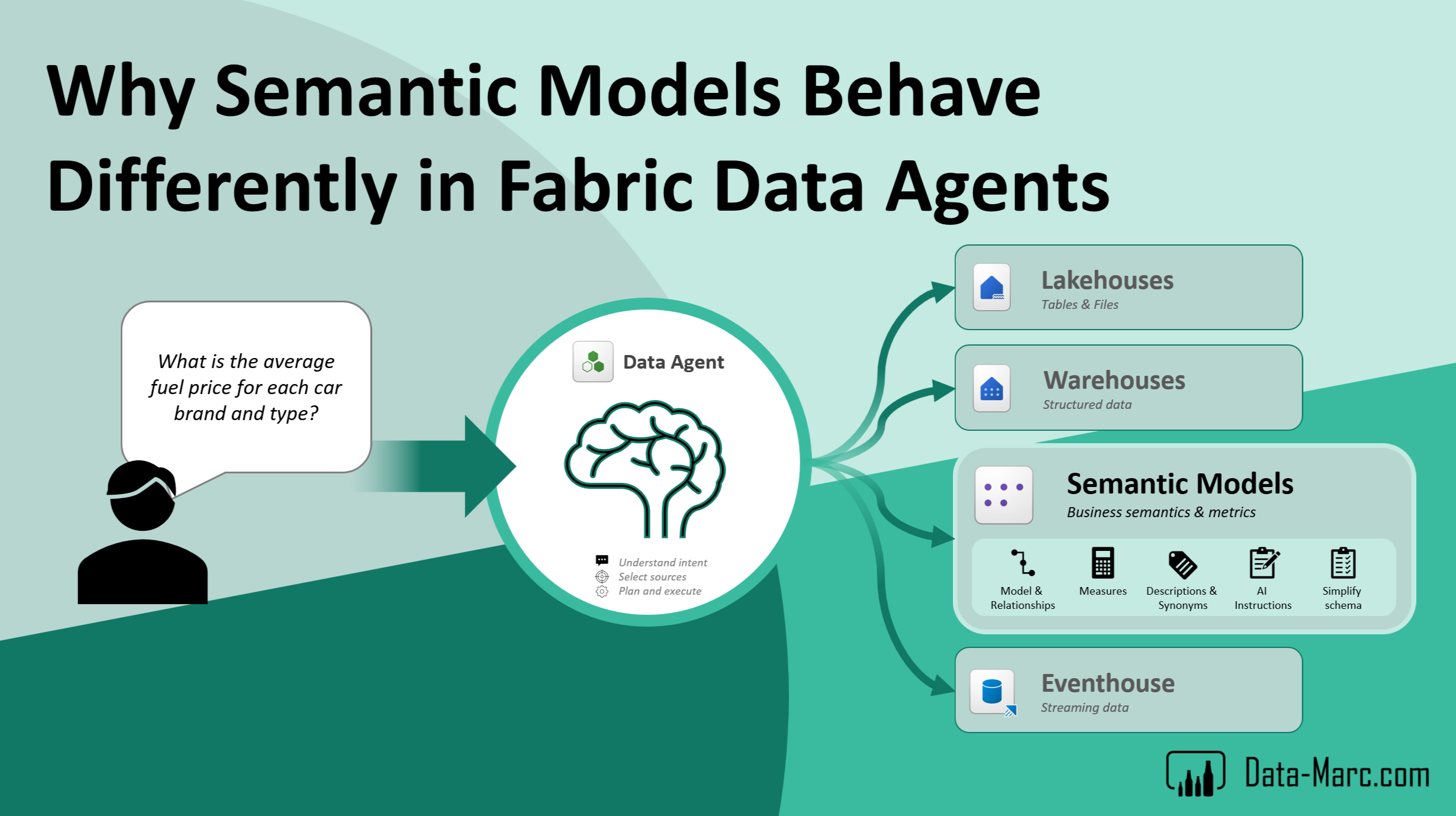
However, things change quite significantly when we move into NL2DAX, specifically when working with Semantic Models. Unlike raw tables or logs, Semantic Models already contain a rich layer of business semantics. They are designed not just to store data, but to describe it. This means they include predefined relationships, business-friendly column and table names, and measures that define key metrics and KPIs. On top of that, they often contain descriptions, synonyms, and other metadata that explicitly define how the model should be interpreted from a business perspective.
Because of this additional context, the behavior of the system becomes more complex and more opinionated. The translation from natural language to DAX is not just about mapping words to columns; it also involves interpreting intent through the lens of the model’s built-in business logic.
When configuring a Data Agent, you may notice that certain tools discussed earlier such as source instructions and example queries are not available for Semantic Models. This is by design. The reason is that Semantic Models already carry their own rich layer of business context. Because of this, additional prompting through source instructions or example queries would often be redundant or even conflicting. Instead, the Semantic Model is expected to provide sufficient semantic clarity on its own, allowing the Data Agent to rely on the existing business logic and metadata when generating responses.
Different behavior with Semantic Models
Table selection does not have the same impact for Semantic Models as it does for other data sources. When a Semantic Model is selected, the entire model is effectively available for querying, regardless of which specific tables are chosen in the configuration. This is because once the connection to the Semantic Model is established, all objects within the model are already within reach.
This behavior is tied to the way passthrough works in this context, as illustrated in the earlier diagram. Unlike other sources, Semantic Models do not rely on additional external context layers within the Data Agent configuration. As a result, options such as table selection do not further restrict or refine the query reach.
Instead, this type of configuration is handled directly within the Semantic Model itself. The “Prep data for AI” layer is where this contextual guidance is defined. Any settings, instructions, or constraints configured by the Semantic Model author in that layer are what ultimately guide how the Data Agent interacts with the model.
The total reach of a query coming from a Data Agent is defined by several limiting factors that together determine what data can actually be accessed and used in a response.
- Security – Row-level security and object-level security are fully enforced because the user identity is passed through to the Semantic Model. This ensures the user only has access to the data and objects they are permitted to see.
- Semantic Model setup – Any tables, columns, or measures that are hidden in the model are excluded from natural language query processing by default. Even if they exist in the model, they are not considered if they are not exposed in the semantic layer.
- Prep data for AI configuration – In addition to the core model design, the “Prep data for AI” layer allows model authors to explicitly include or exclude specific tables, columns, and measures for AI scenarios. This provides additional control over what the Data Agent can use when generating responses.
Together, these layers define the effective boundary of what a Data Agent can see and reason over, combining security, model design, and AI-specific configuration.
Example
Let’s look at a quick example. In the Fuel Analysis Data Agent, I configured two data sources: a Semantic Model and a Lakehouse.
In the Semantic Model configuration, only the Date table is selected in the left-hand data pane. Based on that setup, you would expect the Data Agent to only reason over that specific table. However, when asking the question “What is the average fuel price for each car brand and type?”, the Data Agent still appears to use data beyond the selected table scope. This becomes visible when inspecting the generated DAX query that is executed to produce the result.
What this demonstrates is that the selection in the data pane is not always a hard limitation for Semantic Models. Instead, the Data Agent can still leverage the full semantic context available within the model when generating queries and interpreting intent.
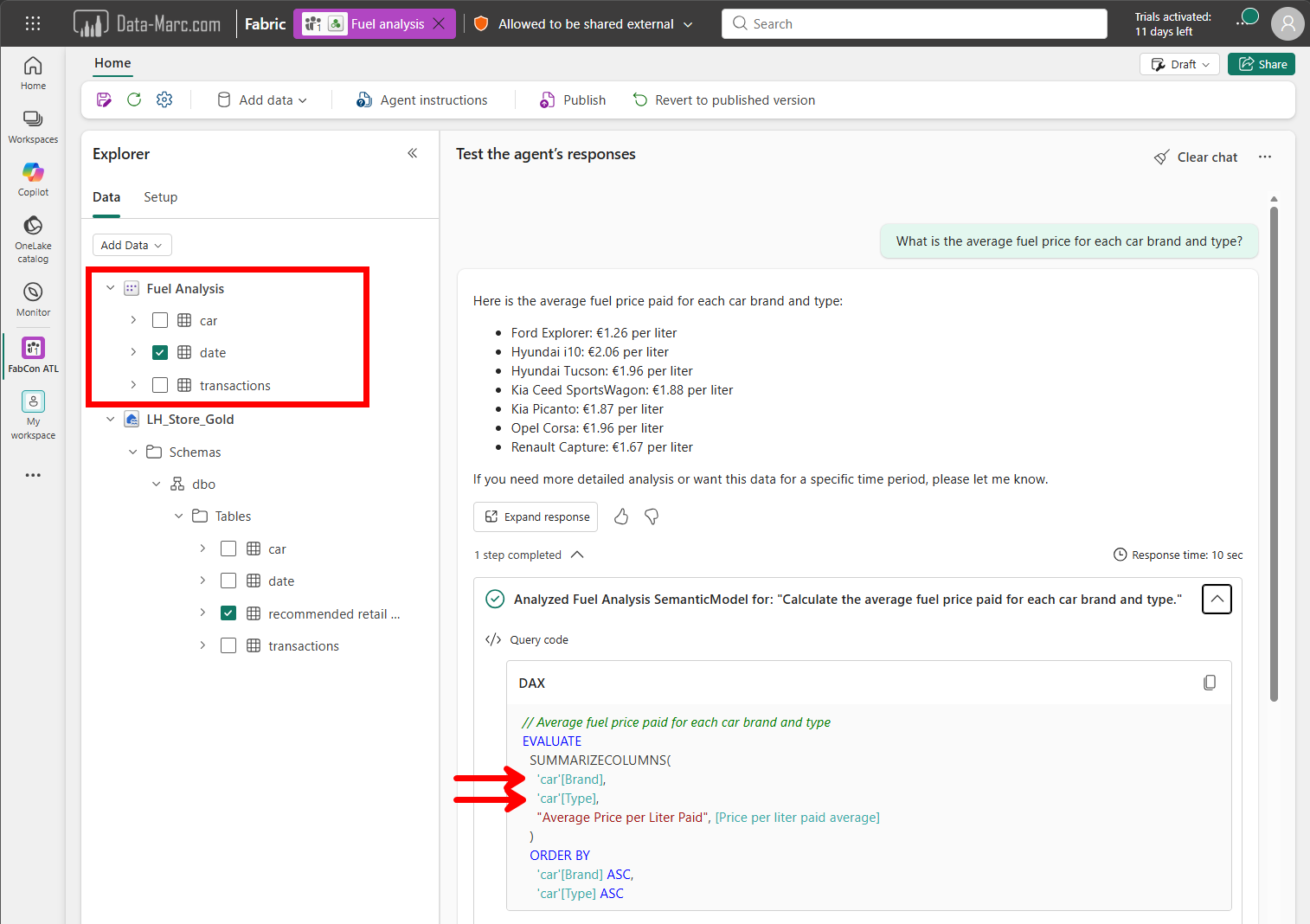
To identify why it used these tables (the Car table in this example), we can see that after expanding the steps completed and exploring the DAX expression. Comparing this to the Prep data for AI configuration of the Semantic Model, in which the Car table as a whole is selected to be used.
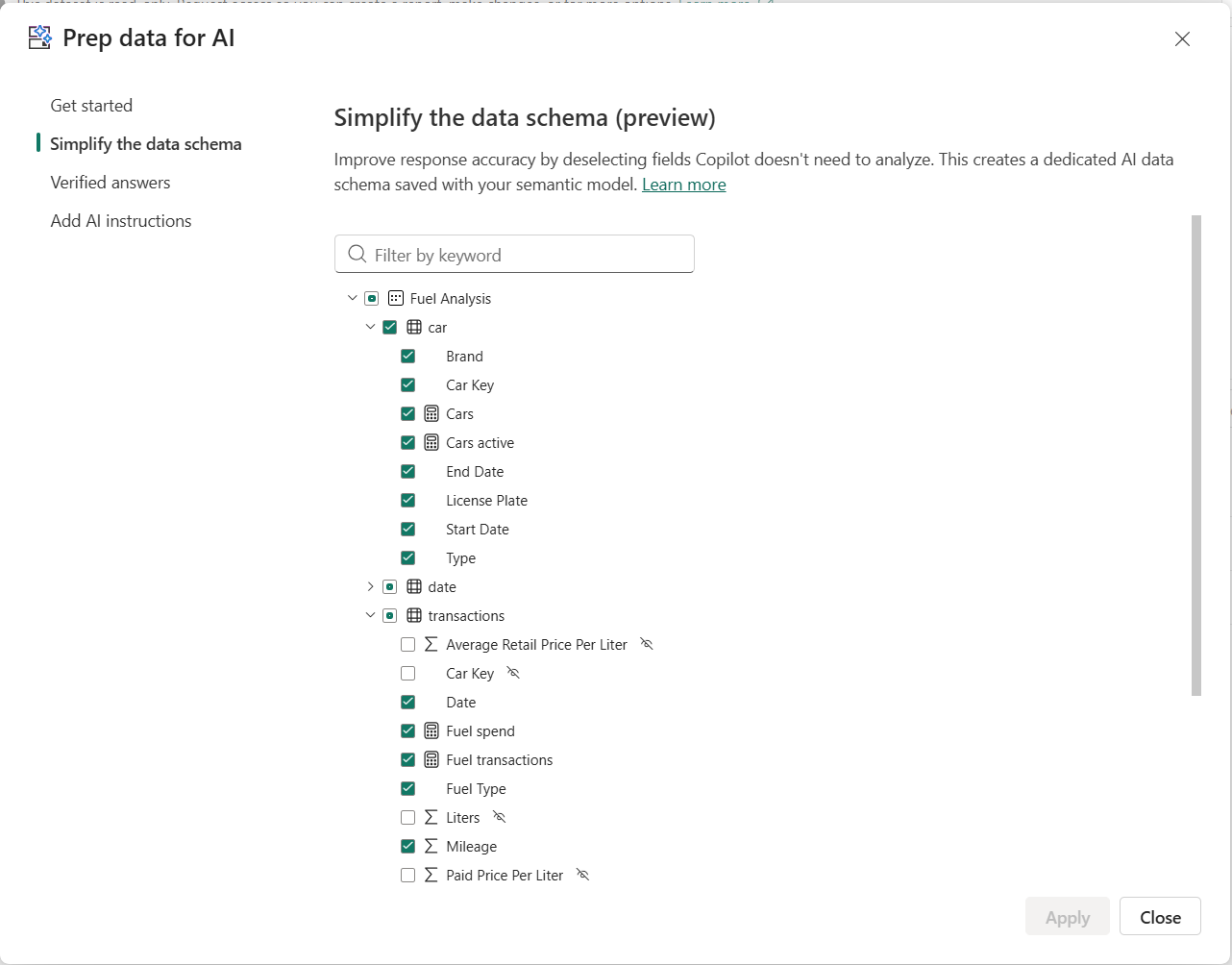
We can conclude that the configuration in “Prep data for AI” is leading and ultimately determines which tables and columns the Data Agent is allowed to reason over. In addition, the AI Instructions defined in the Semantic Model itself are applied first. These are treated as the primary layer of guidance and are taken into account before any instructions configured at the Data Agent level come into play.
Because of this layered instruction model, it is critical to ensure that instructions across the Semantic Model and the Data Agent are aligned and not conflicting. Any inconsistencies between these layers can directly impact answer quality and lead to unexpected or incorrect results.
What if you don’t prepare your Semantic Model for AI?
In case you decide not to invest time in preparing your Semantic Model for AI, the Data Agent will still function. It can still reason over the available metadata, relationships, measures, and visible objects in the model to generate answers.
However, the quality and predictability of the responses will heavily depend on how well the Semantic Model was originally designed. Models with unclear naming conventions, missing descriptions, overly technical column names, or poorly defined measures will naturally make it harder for the AI to correctly interpret user intent.
Without proper AI preparation, the Data Agent also has less guidance on which objects are relevant, which business terms should be preferred, and which areas of the model should or should not be exposed in conversational scenarios. As a result, answers may become less accurate, less consistent, or overly broad.
Preparing the model for AI is therefore not strictly required, but it significantly improves the reliability of the experience. Especially in larger enterprise models, investing in semantic clarity, descriptions, synonyms, and AI-specific configurations will add a lot of value and I would highly recommend investing time in.
Wrap up
Fabric Data Agents provide a powerful way to interact with data using natural language, but the behavior of the agent heavily depends on the underlying data source. While sources such as Lakehouses and Warehouses rely more on Data Agent configuration, Semantic Models behave fundamentally different due to the rich business context they already contain.
Semantic Models bring their own semantic layer, AI instructions, relationships, measures, and business logic into the conversation. This means configurations such as “Prep data for AI” and the overall model design become leading factors for answer quality and query behavior. Important to note, one does not replace the other. So, a badly designed Semantic Model cannot be fixed by AI instructions or vice versa. Good Semantic Models have only become more important than ever before!
An important takeaway is that the quality of your Data Agent experience largely depends on the quality of your data source. Well-structured with clear business logic, meaningful naming, and properly configured AI settings will lead to more accurate and consistent answers. The more context and clarity you provide in the model itself, the better the Data Agent can reason over your data.
Finally, you may wonder where Fabric IQ and in specific ontologies are in this blog as I didn’t talk about them at all. For now, I’ve left them out given the preview status. I’m planning to write separately about ontologies soon!
Special thanks
A special word of thanks is due, as a part of this content is based on the masterclass and precon session that Mathias Halkjaer and I delivered at the Power BI Community Days in the Netherlands. The discussions, demos, and shared insights from that session formed a strong foundation for the ideas and observations described here.


Pingback: Data Agent Prompt Handling and Semantic Models – Curated SQL
Pingback: Rethinking Fabric Data Agent Deployment Using the Data Agent SDK – Data – Marc