
Last week, I was attending and speaking at the first ever Fabric February, a great in-person conference dedicated to Microsoft Fabric taking place in Oslo – Norway. (I recommend attending future editions of this event!) During the conference, someone walked up to me and asked if I knew a way to programmatically refresh Power BI Datamarts. Cause I shared many PowerShell or API related blog posts in the past, this person (apologies, I don’t remember your name) asked if I knew a way to automate Datamarts as well.

Datamarts
If you’re not familiar with Power BI Datamarts, then I do recommend you read one of my previous blogposts first, where I elaborate on why you could consider Datamarts and further explain what Datamarts are.
In short, we can say that Datamarts are a set of Dataflows under the covers, which are put together in a managed SQL database. Datamarts come with a SQL endpoint for usage outside of Power BI, as well as a pre-wired Semantic Model. It also comes with on-demand query capabilites using visual queries and a SQL capability to write queries and save as views.
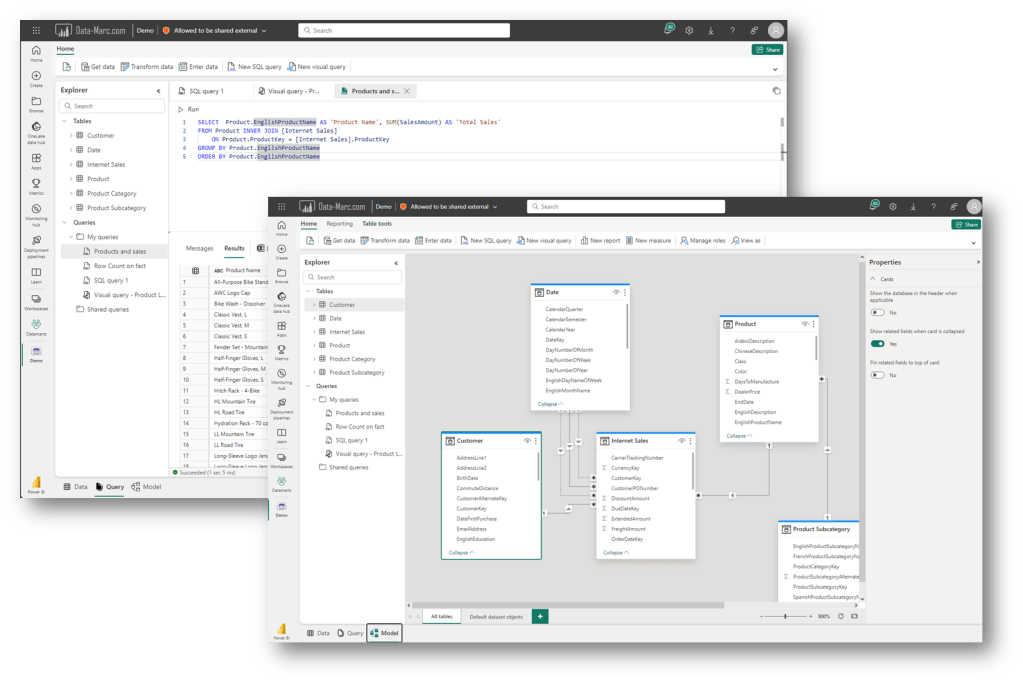
Judging from the interface, there are many similarities between Fabric Datawarehouse and Power BI Datamarts. It comes with similar components and many things work similar as well. Having that said, why would you work with Datamarts if you can use Fabric instead? Especially since Datamarts are in preview for a long time already. Well, Datamarts are available on Power BI Premium per User and therefore an interesting alternative for anyone that cannot use any Microsoft Fabric artifacts.
Can I refresh them programmatically?
Back to the original question. Can I refresh a Datamart programmatically? Well, there is no dedicated API for Datamarts in the Power BI REST API library. But I don’t want to jump to conclusions to easily.
In the past I already concluded that a Datamart in reality has several Dataflows underneath. With some simple API calls we can explore these Dataflows although they are not visible in the Workspace. A simple PowerShell script like below helps us to find these Dataflows
# Define workspace Id

$WorkspaceId = "{InsertWorkspaceId}"


# Sign in to Power BI Service

Connect-PowerBIServiceAccount


# Get all dataflows in workspace

$ListDataflows = Invoke-PowerBIRestMethod -Method GET -Url https://api.powerbi.com/v1.0/myorg/groups/$WorkspaceId/dataflows | ConvertFrom-Json

$ListDataflows.value
As an example, we could get the following response:

So, let’s try to run another API call to refresh one of these dataflows. I used the following code snippet:
# Refresh Dataflow

$body = @"

{

  "notifyOption": "MailOnFailure"

}

"@


$WorkspaceId = "{InsertYourWorkspaceId}"

$DataflowId = "{InsertYourDataflowId}"

Invoke-PowerBIRestMethod -Method POST -Body $body -URL https://api.powerbi.com/v1.0/myorg/groups/$WorkspaceId/dataflows/$DataflowId/refreshes -Verbose
Unfortunately, that didn’t work, it returns an Error 400 – Invalid Request.
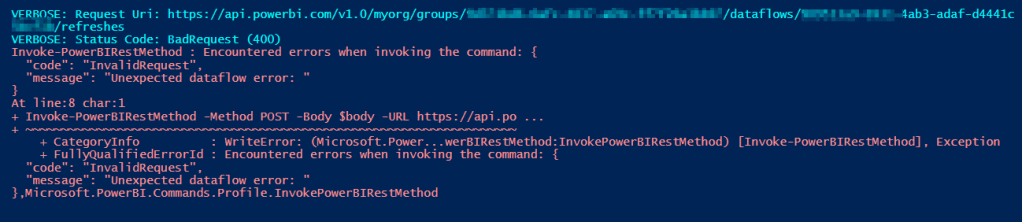
How can you programmatically refresh a Datamart? There is no API apparently. Then we still have that pre-wired Semantic Model that comes with the Datamart. Let’s give it a try if we can refresh the Semantic Model direct. I’ve fetched the Semantic Model id from the browser and run a similar API request.
# Refresh Semantic Model

$body = @"

{

  "notifyOption": "MailOnFailure",

  "retryCount": 3

}

"@


$WorkspaceId = "{InsertYourWorkspaceId}"

$SemanticModelId= "{InsertYourSemanticModelId}"

Invoke-PowerBIRestMethod -Method POST -Body $body -URL https://api.powerbi.com/v1.0/myorg/groups/$WorkspaceId/datasets/$SemanticModelId/refreshes -Verbose
It’s very unfortunate that we bump into a similar type of error when trying to refresh the Semantic Model. Again Error 400. Given it returns a Bad Request in this case, I tried it several ways, also via the “Try It” option in the browser to make sure I didn’t make a typo or anything. But I could not get it to work.

Wrap up and conclusion
Well, I think you can guess my conclusion already. Today, there is no API or trick by using other official supported APIs to programmatically refresh a Datamart in Power BI. Neither via the Dataflows or the Semantic Model (Dataset) APIs I could get it to work.
Given Datamarts are also still in preview even after their initial introduction back in May 2022 and some minor updates in January 2023, I can no other than conclude that Datamarts are not mature at this point in time. By designing a new solution, it should be clear from the start that the only option to refresh a Datamart is through a scheduled refresh, but not though any automation to bind the refresh to other processes.
If I would start building a new solution from scratch, I wouldn’t necessarily choose for Datamarts but rather consider working with Microsoft Fabric Warehouses and a small F2 capacity for example. Mainly due to uncertainty around the future of Datamarts given the preview state it is in for a long time already and no real development has happened over the past year(s).
 Data - Marc
Great article! Indeed, it’s only partially possible with documented APIs. Fortunately, the Semantic Model is directly subject to Datamart, so a refresh can be invoked via https://{cluster}/v1.0/myorg/datamarts/{datamartId}/refresh via the POST method with empty content. I verified that I can send it as a user in a quick test. I then have to test sometime if it also passes through the ServicePrincipal.
LikeLike
Pingback: Programmatic Power BI Datamart Refreshes – Curated SQL