Over the past year, I’ve written quite a bit about Fabric Data Agents. From configuring them and preparing Semantic Models for AI, all the way to deploying Data Agents using the Data Agent SDK. But once you start moving Data Agents beyond experimentation, another question quickly becomes relevant: “How do you actually know whether your Data Agent continues to return the right answer?”
Of course, you can open the Data Agent, enter a prompt and manually validate the response. That works perfectly fine while experimenting with a handful of questions, although it can already become quite time-consuming. Now imagine having to validate 20, 50 or maybe hundreds of questions, and not just once, but every time your data, Semantic Model, Agent Instructions or other parts of the solution change.
There is another aspect to this. With generative AI, we don’t only care about accuracy, but also about determinism. If we ask the same question again, can we rely on the Data Agent to consistently produce the expected outcome? This is where automated testing becomes increasingly important.
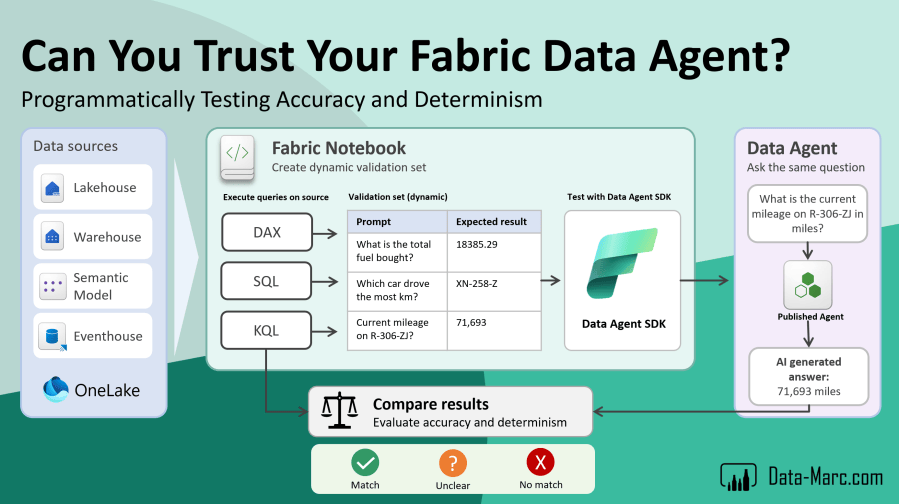
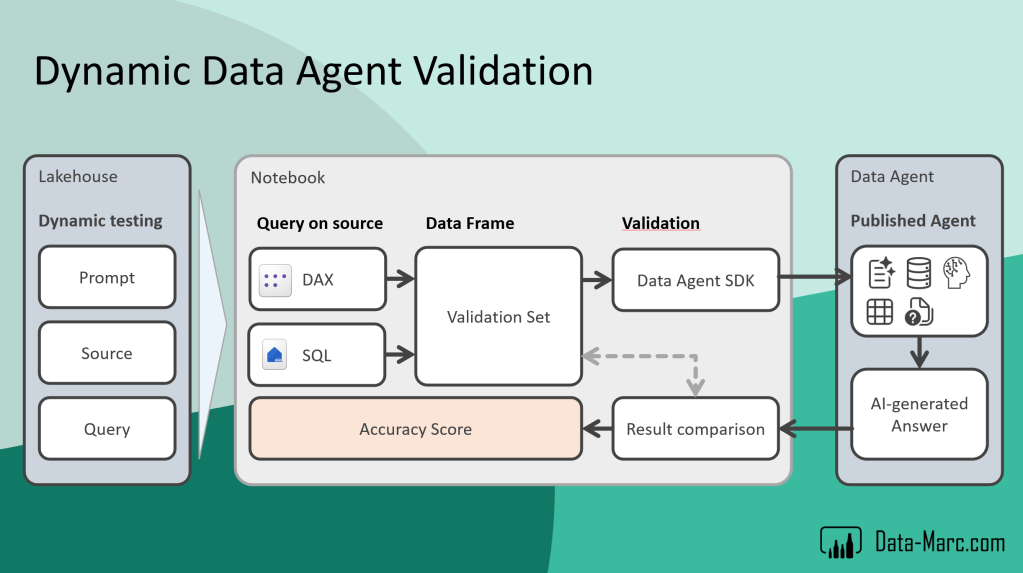
In this blog, I will start with the ground truth testing capabilities available in the Data Agent SDK and take these a step further. Rather than relying on a fixed validation set with expected answers that can quickly become outdated, we’ll dynamically calculate those expected answers directly from the underlying data sources at runtime. This gives us a repeatable way to test a Data Agent over time: generate the current expected results, ask the Data Agent the same questions, compare the outcomes, and evaluate its accuracy and determinism.
Ultimately, the goal is not to prove that a Data Agent returned the right answer once. It is to build a repeatable process that helps us validate whether we can continue to trust its answers over time.
Why test a Data Agent in the first place?
When working with traditional software, automated testing is completely normal. We change something, execute our tests and verify that existing functionality still behaves as expected. With AI-based analytics experiences, we sometimes seem to accept a completely different approach. We configure the Data Agent, ask a few questions and conclude:
“Looks good to me”
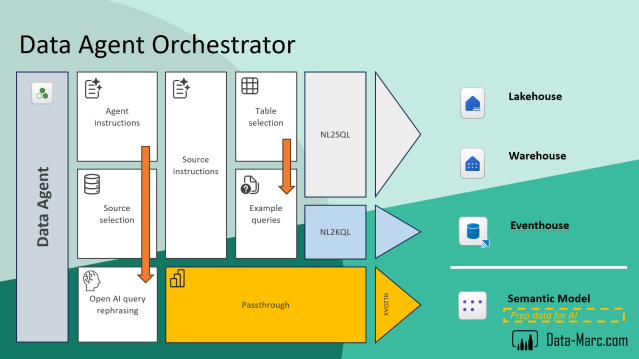
The challenge is that a Data Agent contains multiple layers that can potentially influence the final answer. The Agent Instructions guide how the agent should interpret requests. Source definitions determine which sources can be used. Source instructions and example queries provide additional context. When Semantic Models are involved, another layer of metadata and AI configuration comes into play as well. The Data Agent ultimately orchestrates these components to determine how a question should be answered. But one small change in any of these context layers can directly influence the outcome of the Data Agent.
The Fabric Data Agent SDK includes a build in component to validate your Data Agent. It allows you operate ground truth testing programmatically from a Fabric Notebook. The option to evaluate data agents in code, is nicely documented in public documentation here. If you’re completely unfamiliar with the Data Agent SDK, it is recommend checking out the documentation, as well as a previous post about Rethinking Data Agent deployment for example, in which the Data Agent SDK is also used.
First of all, we load a few packages in our notebook using the following commands:
# Loading Data Agent SDK
%pip install -U fabric-data-agent-sdk --q
from fabric.dataagent.evaluation import evaluate_data_agent
from fabric.dataagent.evaluation import get_evaluation_summary
from fabric.dataagent.evaluation import get_evaluation_details

import pandas as pd
import sempy.fabric as fabric
Using the Data Agent SDK, we can start using ground truth testing capabilities that are build in. Before we can do so, we need to define which Data Agent we want to test, which I captured in variables:
data_agent_name = "Fuel analysis"
workspace_name = None # if left empty, it redirects to the current workspace
lakehouse_name = "LH_MONIT_DataAgentQuality"
Continuing with the testing scenario, this example uses my own data about fuel transactions of my (previously owned) cars. Using the Data Agent SDK, we can setup a validation set in a pandas dataframe which looks something like below:
# Define a sample evaluation set with user questions and their expected answers.
# You can modify the question/answer pairs to match your scenario.
df = pd.DataFrame(
    columns=["question", "expected_answer"],
    data=[
        ["what is the total fuel bought at the gasstation?", "18385.29"],
        ["which car has driven the most kilometers?", "XN-258-Z"],
        ["What is the current mileage on R-306-ZJ in miles?", "71,693"]
    ]
)
We can now run this test set, consisting of three questions and expected answers perfectly through the Data Agent SDK to validate the outcome. Running the test does not only output the results on screen in the interactive Fabric Notebook using the Data Agent SDK, but also saves the detailed results to the attached Lakehouse.
# Two tables will be created:
# - "<table_name>": contains summary results (e.g., accuracy)
# - "<table_name>_steps": contains detailed reasoning and step-by-step execution
table_name = "demo_evaluation_output"

# Specify the Data Agent stage: "production" (default) or "sandbox"
data_agent_stage = "production"

# Run the evaluation and get the evaluation ID
evaluation_id = evaluate_data_agent(
    df,
    data_agent_name,
    workspace_name=workspace_name,
    table_name=table_name,
    data_agent_stage=data_agent_stage
)

print(f"Unique ID for the current evaluation run: {evaluation_id}")
Building up a validation set like this seems easy, however that is also where the problem starts. What might be the expected answer today, is likely not the expected answer tomorrow. But why?
Our data doesn’t stand still. Tomorrow, another fuel transaction might be loaded, which means 18385.29 is no longer the correct total. Another car might have driven more kilometers than XN-258-Z. And as soon as new mileage data arrives for R-306-ZJ, its current mileage is no longer 71,693 miles.
Checking the evaluation summary of our test, uses below code snippet which prints the test runs to screen together with the summarized result:
# Define the table name earlier in the notebook
table_name = "demo_evaluation_output"

# Retrieve a summary of the evaluation results
df_summary = get_evaluation_summary(table_name=table_name, verbose=False)
print(df_summary)
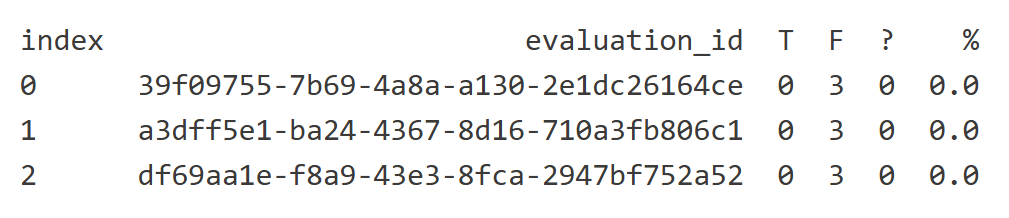
In this example, we have run the test three times, and in all three times all validation has failed as you can see in above screenshot. So, our accuracy is 0.0%. Insights in the evaluation details can be achieved using below code snippet to get one exact evaluation:
# Get the first evaluation_id from the dataframe
evaluation_id = df_summary.iloc[0]["evaluation_id"]
display(evaluation_id)

# Whether to return all evaluation rows (True) or only failures (False)
get_all_rows = True

# Whether to print a summary of the results
verbose = True

# Retrieve evaluation details for a specific run
eval_details = get_evaluation_details(
    evaluation_id,
    table_name,
    get_all_rows=get_all_rows,
    verbose=verbose
)
This will result in a new output result showing you the prompt, expected answer and the generated answer, along with the evaluation judgement which was already displayed in the evaluation summary:
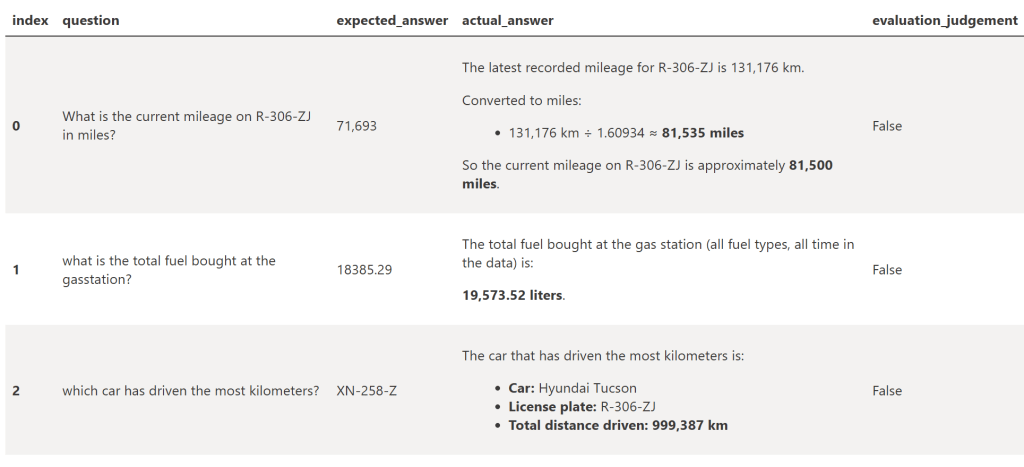
Our Data Agent could return the new and completely correct answer, while our test tells us it is wrong. That’s the fundamental problem with a fixed evaluation set. Over time, we’re no longer testing the Data Agent against the current truth in our data. We’re testing it against what used to be true when we created the test set. Of course, we could continuously update all expected answers. But besides the maintenance involved, that doesn’t scale particularly well when you have tens or hundreds of test questions.
Extending the SDK framework
Instead of storing the answer, what if we store the logic to calculate the answer in our validation set? That way, every time we run our tests, we can first retrieve the correct result from the underlying data source and then compare that result with the answer returned by the Data Agent. And that’s where our evaluation set becomes dynamic rather than static.
We’re moving from a static testing scenario to dynamic testing.
Static testing
- Predefined values stored in the notebook (dataframe) for testing
- Easy to setup and guarantees results across runs
- Limited flexibility: cannot cover new or changing data
- Mainly used for unit tests or small-scale validations
Dynamic testing
- Stores the query instead of hardcoded values
- Pulls data from the source at runtime for realistic testing
- Enables validation against changing data
- Supports end-to-end checks
- Scales easily with multiple tables or environments, aligning with automated QA pipelines
In the setup for dynamic testing, we’re capturing more information than what we had before in the static testing dataframe. Mostly because Data Agents can reason over multiple data sources, we also want to store information related to a variety of data sources. All this information is stored in a lakehouse table so we can repeat testing scenarios in the future. Below table shows what information we capture and why.
| What | Why |
| Prompt | The natural-language question we want the Data Agent to answer and validate. This is the exact prompt that will be submitted to the Data Agent during the test |
| WorkspaceName | The name of the Fabric workspace containing the data source we consider authoritative for this test. This allows the test to locate the correct source, especially when the same or similarly named sources exist across multiple workspaces or environments. |
| SourceType | Identifies the type of Fabric data source against which the answer must be validated. Supported values in this testing approach are Semantic Model, Lakehouse, Warehouse, and Eventhouse. Mirrored data can also be covered through the Fabric item where that data ultimately resides, such as a Lakehouse. The source type also determines how the validation query needs to be executed. |
| ExpectedSource | The name of the specific data source that contains the information required to answer the question. Depending on SourceType, this could for example be the name of a Semantic Model, Lakehouse, Warehouse, or Eventhouse. Together with WorkspaceName, this tells the test exactly where the expected result should come from. |
| Query | The query that independently calculates the expected answer directly from the specified data source. Depending on the source, this can be DAX, SQL, or KQL. Instead of storing a fixed expected value, the query is executed each time the test runs, ensuring the Data Agent response is compared against the result from the current source data. |
With all this information in place, we can dynamically generate the expected results for our validation set. For every question, we first execute the corresponding DAX, SQL, or KQL query against the specified data source. The result of that query becomes the expected answer at that moment in time.
Finally, this results in the below setup:
# Get evaluation set
df_testset = spark.sql(f"SELECT * FROM {lakehouse_name}.dbo.dynamic_evaluation_prompts")
display(df_testset)
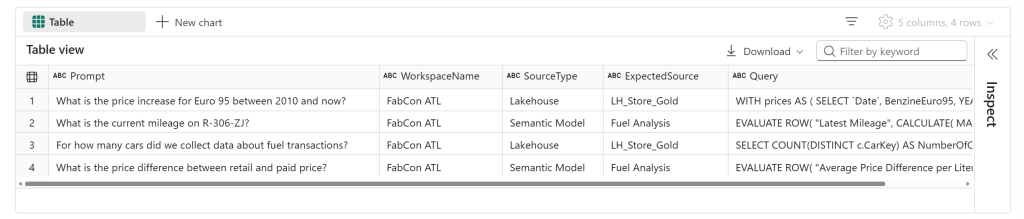
It is important to repeat this step every time we run the Data Agent validation. After all, our data does not stand still. New data may have been loaded into the Lakehouse, a Semantic Model may have been refreshed, or the underlying Warehouse or Eventhouse may contain more recent information than during our previous test run. This is exactly why using a fixed set of expected values doesn’t make much sense for this type of validation. Instead, we dynamically generate the expected answers from the same data foundation that our Data Agent is expected to reason over.
The below code snippet helps you to generate the answers dynamically. Currently this works for lakehouses and semantic models. Keep in mind that the identity of the notebook executor is used to query the sources. Any security that may apply on the data sources may influence the results.
# Get evaluation set
df_testset = spark.sql(f"SELECT * FROM {lakehouse_name}.dbo.dynamic_evaluation_prompts")

# Convert to pandas for iteration
rows = df_testset.toPandas()

results = []

for _, row in rows.iterrows():

    source_type = row.SourceType
    prompt = row.Prompt
    query = row.Query

    print(f"Processing Prompt: '{prompt}'")
    print(f"SourceType: '{source_type}'")
    print(f"Query preview: {query[:200]}...\n")

    # -----------------------------------------
    # Semantic Model execution
    # -----------------------------------------
    if source_type == "Semantic Model":

        workspace_name = row.WorkspaceName
        dataset_name = row.ExpectedSource

        print(f"Workspace: '{workspace_name}'")
        print(f"Semantic Model: '{dataset_name}'")

        result = fabric.evaluate_dax(
            workspace=workspace_name,
            dataset=dataset_name,
            dax_string=query
        )

        results.append({
            "Prompt": prompt,
            "SourceType": source_type,
            "Source": dataset_name,
            "ExecutedQuery": query,
            "Result": result
        })


    # -----------------------------------------
    # Lakehouse execution
    # -----------------------------------------
    elif source_type == "Lakehouse":

        lakehouse_id = row.WorkspaceName

        print(f"Lakehouse ID: '{lakehouse_id}'")

        df_result = spark.sql(query)
        result_pd = df_result.toPandas()

        results.append({
            "Prompt": prompt,
            "SourceType": source_type,
            "Source": lakehouse_id,
            "ExecutedQuery": query,
            "Result": result_pd
        })


# Convert combined results to dataframe
results_df = pd.DataFrame(results)

display(results_df)
The result is a new dataframe containing all information that we collected for ground truth testing, together with its dynamically generated expected answer. In other words, we end up with the same structure we used for our fixed ground truth testing earlier, but with one crucial difference: the expected answers now represent the current state of our data. From there, we can use this dynamically generated validation set to test both the accuracy and determinism of our Data Agent.
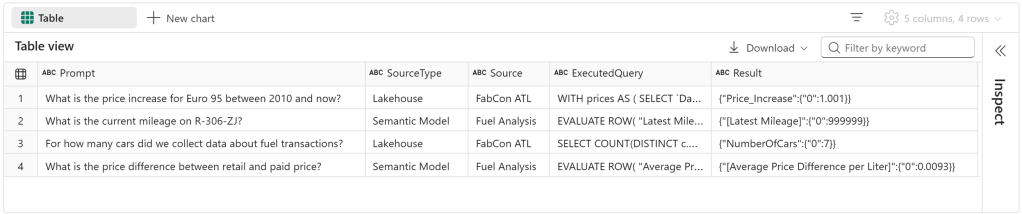
To run the same test using the Data Agent SDK, we pack together only the first and the result which is wrapped in the json in the last column, so we only have a dataframe containing prompt and expected answer.
df_dynamictestset = pd.DataFrame(
    columns=["question", "expected_answer"],
    data=[
        [row["Prompt"], str(row["Result"].iloc[0, 0]) if hasattr(row["Result"], "iloc") else str(row["Result"])]
        for _, row in results_df.iterrows()
    ]
)

display(df_dynamictestset)
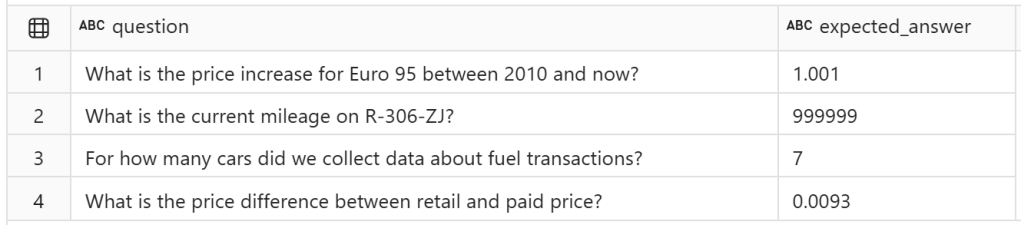
Based on this set, we start our dynamic testing scenario by running these questions and expected answers through the Data Agent SDK to retrieve the results produced by the Data Agent. This code snippet is more less the same as we had before with static testing. However, keep in mind that we’re referring to a different input dataframe here.
# Two tables will be created:
# - "<table_name>": contains summary results (e.g., accuracy)
# - "<table_name>_steps": contains detailed reasoning and step-by-step execution
table_name = "dynamic_test_output"

# Specify the Data Agent stage: "production" (default) or "sandbox"
data_agent_stage = "production"

# Run the evaluation and get the evaluation ID
evaluation_id = evaluate_data_agent(
    df_dynamictestset,
    data_agent_name,
    workspace_name=workspace_name,
    table_name=table_name,
    data_agent_stage=data_agent_stage
)

print(f"Unique ID for the current evaluation run: {evaluation_id}")
After successful evaluation, we get the results again using this code snippet:
# Retrieve a summary of the evaluation results
df_summary = get_evaluation_summary(table_name=table_name, verbose=False)
print(df_summary)
And finally, we can look into one specific evaluation:
# Get the first evaluation_id from the dataframe
#evaluation_id = df_summary.iloc[0]["evaluation_id"]
evaluation_id = "6ed07c9e-7f40-4159-a67d-1ad095839c89"

# Whether to return all evaluation rows (True) or only failures (False)
get_all_rows = True

# Whether to print a summary of the results
verbose = True

# Retrieve evaluation details for a specific run
eval_details = get_evaluation_details(
    evaluation_id,
    table_name,
    get_all_rows=get_all_rows,
    verbose=verbose
)
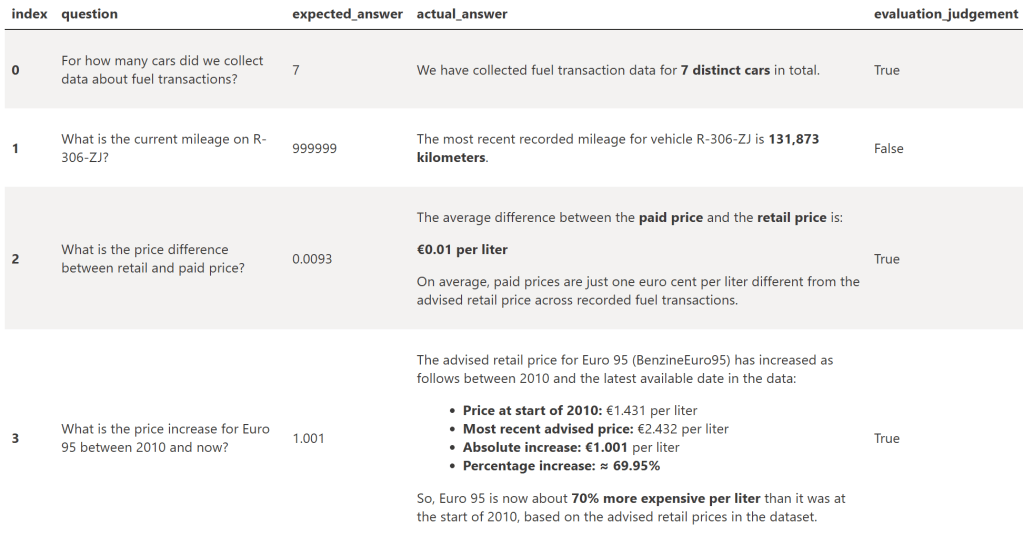
Looking at the results, we can clearly see that the output from the Data Agent contains much more context and more information than what we had captured in our validation set. Especially with the last row we can see the Data Agent produced much more information than we initially asked for. Though, it is still evaluated as True and matching the expected outcome as one of the returned answers matches the expected output.
Now, we have completed a full circle. We can submit the exact same questions to the Data Agent and compare its responses with our dynamically generated expected results.
And this is where I think dynamic testing becomes especially useful. We can run exactly the same test set again after our data has been refreshed, after changing the Data Agent instructions, after making changes to the underlying data model, or simply as part of a recurring validation process. There is no need to manually update the expected answers first, because they are recalculated from the source at the beginning of every run. In other words, the questions and validation logic remain stable, while the expected answers move together with our data.
Run it again tomorrow and the process remains exactly the same. The source data may have changed, and therefore the expected answers may have changed as well, but our validation approach hasn’t. And that is ultimately what I wanted to achieve with dynamic testing: not proving that my Data Agent knew the right answer once, but having a repeatable way to validate whether it still knows the right answer every time I test it.
What about data quality?
For those of you who have been paying attention, you may have noticed another interesting problem: what if our dynamically generated expected answer is actually wrong?
Take the question about the current mileage of R-206-ZJ. Our validation query returned 999999 as the expected answer. Even at first glance, that value looks suspicious. It could very well be a placeholder or simply an incorrect value somewhere in the underlying data. The Data Agent, however, returned 131,873, which in this case seems much more plausible.
This highlights something important. The expected result coming directly from the source isn’t automatically the correct answer. A Data Agent can have Agent Instructions, while an underlying source such as a Semantic Model can contain additional business logic that deals with known data-quality issues. As a result, the Data Agent may sometimes produce a more reliable answer than our validation query. Therefore, a failed test should not immediately lead to the conclusion that the Data Agent is wrong. Quality assurance needs to happen on both sides: on the dynamically generated validation set and on the responses produced by the Data Agent. Just like any data solution we’ve built in the past, a Data Agent needs an owner who monitors, validates and maintains it over time, just as we already do with our Semantic Models and other analytical solutions. The automated testing explained above, and saving the output of this, simply helps to the owner to find areas for improvement.
Most importantly: In the end, your Data Agent is only as good as your data, and only as reliable as the data foundation underneath it.

