
Recently, I had two enterprise customers with whom I was in conversation about Microsoft Fabric and how it could complement their existing data landscape. Both of these customers have a data platform running already, which have lots of best practices and customizations in it, not necessarily portable to Fabric. Also, both came from a standpoint to disable Fabric as a whole for now via the tenant settings, until more granular controls are available. However, there is a “gotcha” in there, which you should be aware off! This blog explores the reasons behind the decision to disable Fabric, shedding light on crucial nuances and potential oversights in the process.

Why disabling Fabric in the first place?
In case you were not aware yet, Microsoft Fabric is now General Available since the Ignite Conference mid-November 2023. Before that, many customers tend to disable Fabric, or limit Fabric due to the preview state of the product. Since GA, that’s not a valid argument anymore.
Also, in case you did not pay attention as Fabric / Power BI administrator, Fabric might have been enabled automatically in your tenant. At preview launch in May 2023, Fabric was disabled by default. However, if you did not touch the tenant setting and explicitly enabled/disabled it as an admin, the switch flipped to enabled automatically starting July 1st 2023. This was announced in the release blog post, but I figured many folks were not aware of this.
The second biggest reason that I tend to hear is that organizations still have to figure out how Fabric complements their data landscape and till what extend it is competing with the products and services they currently use. In line with that, I wrote a blogpost earlier about Debunking Myths and Embracing Innovation with Microsoft Fabric.
Don’t get me wrong though, this blog is not to convince you to “just enable Fabric”. It must be a careful consideration and in alignment with enterprise architecture. However, I do believe you also shouldn’t overcomplicate things.
Often, I also hear arguments like: “We don’t want to have another bunch of data lake houses and warehouses, which are not our enterprise-wide platform”, which is fair and understandable. Though, I truly think the effect of having more of these artifacts is not a risk at all. Because the main concern is having multiple copies of the same data, where new logic is applied. But if we have a closer look at what has been happening over the past years with Power BI semantic models (aka dataset), it is more less the same. We import a bunch of data, transform it and do whatever we want, which can potentially grow into a monster. Down the line, it all relates back to having control, monitoring capabilities and proper governance implemented.
Disable it!
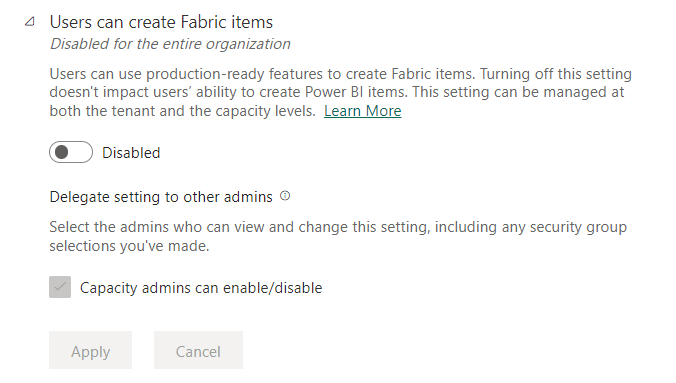
Okay, the decision is made by higher powers in the organization. We have to disable Fabric for now, until we have more granular controls to block certain artifacts for example. As Fabric Tenant administrator, you have to flip the switch. You did what they asked you for, but there is a gotcha in here!
Gotcha
said to mean “I have got you” in order to surprise or frighten someone you have caught, or to show that you have an advantage over them.
From: GOTCHA | English meaning – Cambridge Dictionary
As you can already see on the screenshot, the delegated tenant settings is greyed-out. Which basically means that capacity administrators can enable Fabric for their tenant again. The general tenant setting will apply as the default though.
So, let’s say I’m a capacity administrator now, intentionally signed in with a different user account and I navigate to my Capacity settings, I do find a section called “Delegated tenant settings” in which I can enable Fabric for my capacity only. As administrator you can explicitly mention that you want to deviate from the tenant admin selection.

Now what?
Okay, this might not be what you hoped for as tenant administrator or enterprise architect. Basically, you are not in full control of the tenant settings when you have various capacity administrators in your organizations. This can potentially cause issues where Fabric artifacts can be created which might not be in line with your reference architecture.
Coming back to the two customers I talked about earlier, one of them has all capacities in their own control and so far no issue as everything is still in their control. The other one has numerous capacities of which many have delegated admin permissions to the departments and countries that have their own capacities. Down the line, these folks can enable Fabric for their own usage although the organizational standard says not to.
Again, monitoring and governance is key! With an API call, you can get a grip on deviated tenant settings on each of your capacities. The Fabric API Tenants – Get Capacities Tenant Settings Overrides allows you to directly get an overview of which settings are changed on which capacity. I tried this on my own tenant and got the following result, in which the ID corresponds with the capacity ID.
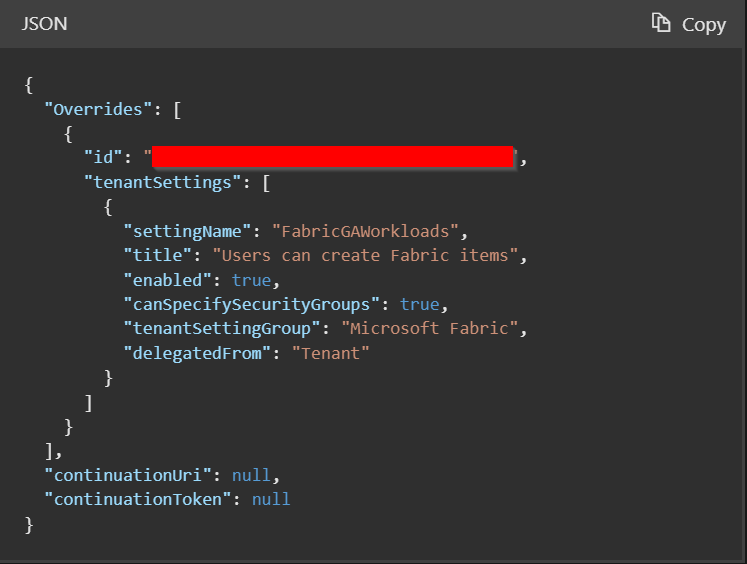
Still, my information is not complete. I know there is a capacity which has Fabric enabled now, but I don’t know directly who are the capacity administrators of this specific capacity. The Fabric REST APIs do not allow me to get this information. However, since Power BI and Fabric tenant are the same, we can leverage the Power BI REST API for this cause. By using the Admin – Get Capacities As Admin API, we can get a list of all existing capacities and the responsible administrators. Also this I tested, to see if all types of capacities are included in the response.

Above results shows that various types of capacities are included and show a good overview. By combining both API results, you can directly get a grip on capacities, their administrators and deviated tenant settings. Of course, I could have gone to the admin portal as well given every Fabric administrator can see all capacities. But given I’m rather efficient (lazy), I prefer to put this in a report and put some alerting on it using Data Activator for example. Whoops… then I need Fabric suddenly 😉😁.
Wrap up
Blocking Fabric from tenant settings might not be what it looks like. The gotcha is basically that every capacity administrator can decide on their own whether they want to enable Fabric or not. Also, I would encourage every enterprise architect to rethink their perspectives about Fabric. I’m not here to sell it, but personally I don’t see anything essentially different than what we’ve been doing for years now with Power BI imported datasets. However, endorsement and the rest of your governance setup has become more important than ever to identify certified content and whatsoever. Also, to put it out there once more, monitoring has become more important than ever. Once again, the APIs to the rescue!
 Data - Marc