Copilot promises fast answers, smart insights, and a more natural way of working with data. And when it works well, it feels almost magical. But for many organizations, reality looks different. Answers are inconsistent, assumptions are made, and trust fades quickly.
Most of the time, it comes down to context. The context users provide in their questions, the context available in the data, and the context defined by governance and preparation. But context alone is not enough. Without a foundation of trust in your data and models, and proper governance, Copilot’s answers can be misleading, inconsistent, or just plain wrong.
In this blog, I will walk through why context matters so much, how governance and data preparation shape Copilot’s behavior, and what organizations need to do to move from impressive demos to answers they can actually rely on.
It all starts with context
I’ve heard it so often from customers, colleagues and many others, “Copilot did not do what I expected it to do.” or comments along the same lines. Well, what did you expect? Did you provide enough context in your prompt? How do you expect copilot to find the relevant semantic model or report to answer your question?
It’s an easy comparison to make, asking questions to copilot is no difference to asking a random question to Google, Bing, or your favorite search engine. Just search for images and type “Car” and you get all sorts of answers. Then search for “Red car” and your results improve already. Now, try searching for a “Red sports car” and results will be more accurate already. Finally, search for “Red sports car of Italian brand” and likely the majority of your results will be Ferrari (partly depending on your cookies).
You may wonder, what does this have to do with usage of copilot in Microsoft Fabric and Power BI? If I’m using the Copilot on top of your data, the results you may get are highly depending on the context you provide. If I just ask for “Total sales” every semantic model or report I have access to and include “Sales” in the name, or has an object named “Sales” could potentially form the answer to my question. “Copilot on home” also known as the chat with your data experience, first asks you which source you want to use before answering the prompt and provides three suggestions. Though, it is risky to fully rely on the three suggestions that are given to you based on the little context provided.
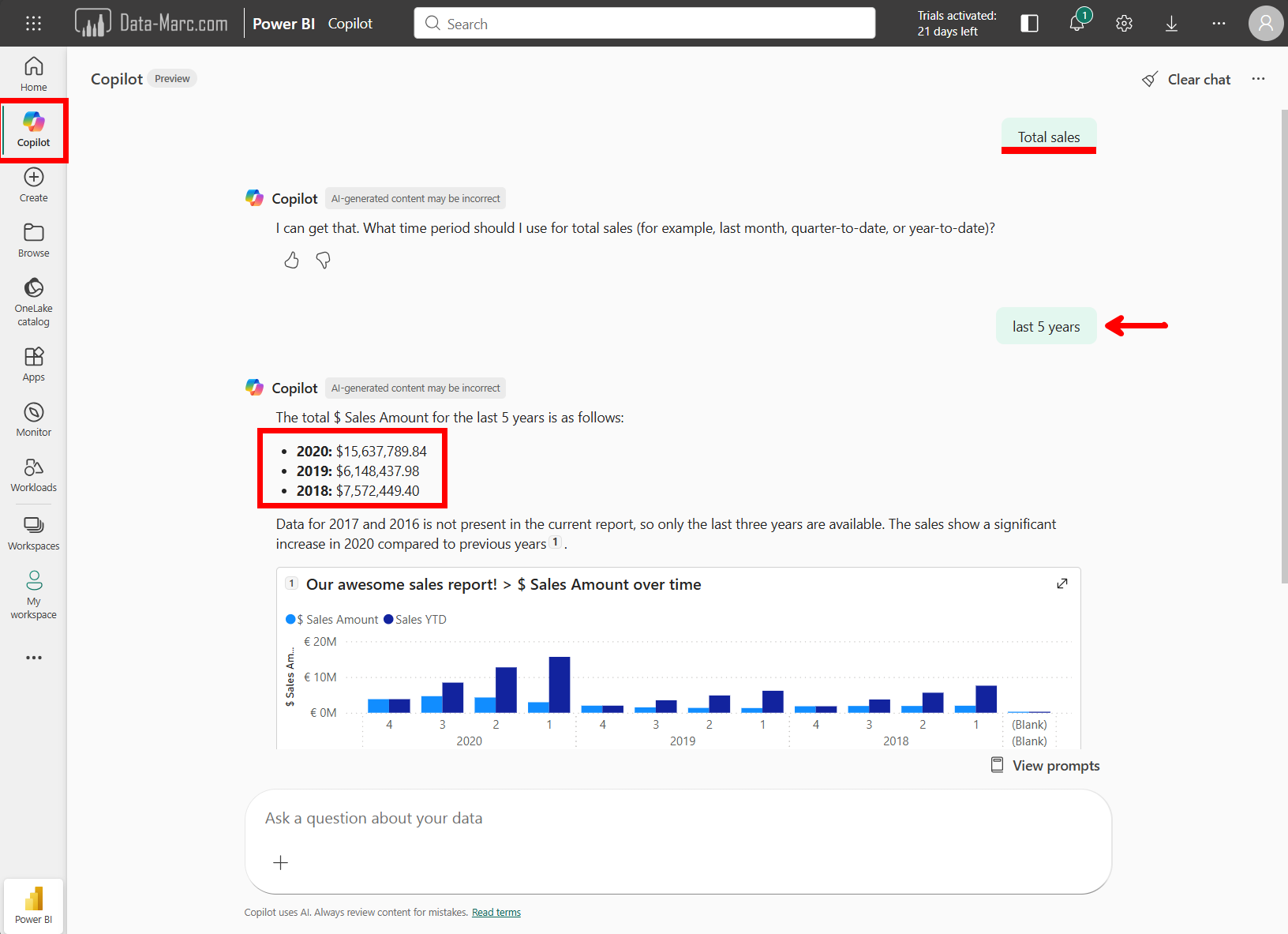
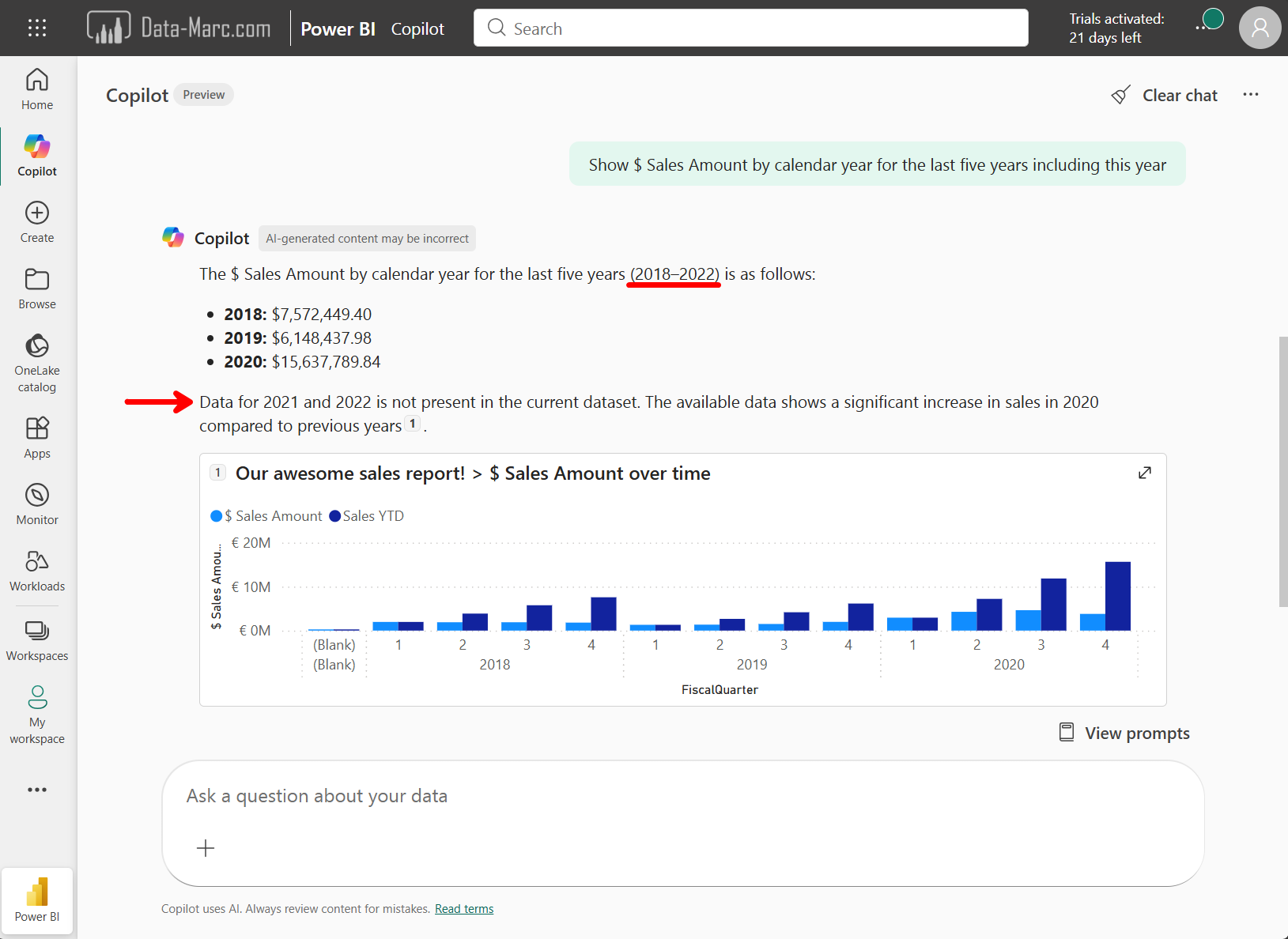
As you see in the example above, it may not always ask which source you want to use to answer your prompt. In the above example, it asked for more context – such as the time frame over which I want to analyze the sales. In my example, I said “last 5 years”, as it is 2026, I expected it to go back in time 5 years maximum and provide an answer based on 2021 > 2026. It did not.
Weirdly, what happened is that it picked the report which the user has access to and took a 5-year timeframe within that dataset. The explanation provided by copilot also says for the year 2017 and 2016 there was no data available. Summing up the years for which an answer is provided and the two missing years, it likely just took the MAX(‘Date'[Year]) and took five years of that.
Assumptions done by copilot are very dangerous. As this may lead to answers which are far different than what we expect. Where a user doesn’t provide enough context, copilot will ask for it such as in the below example:
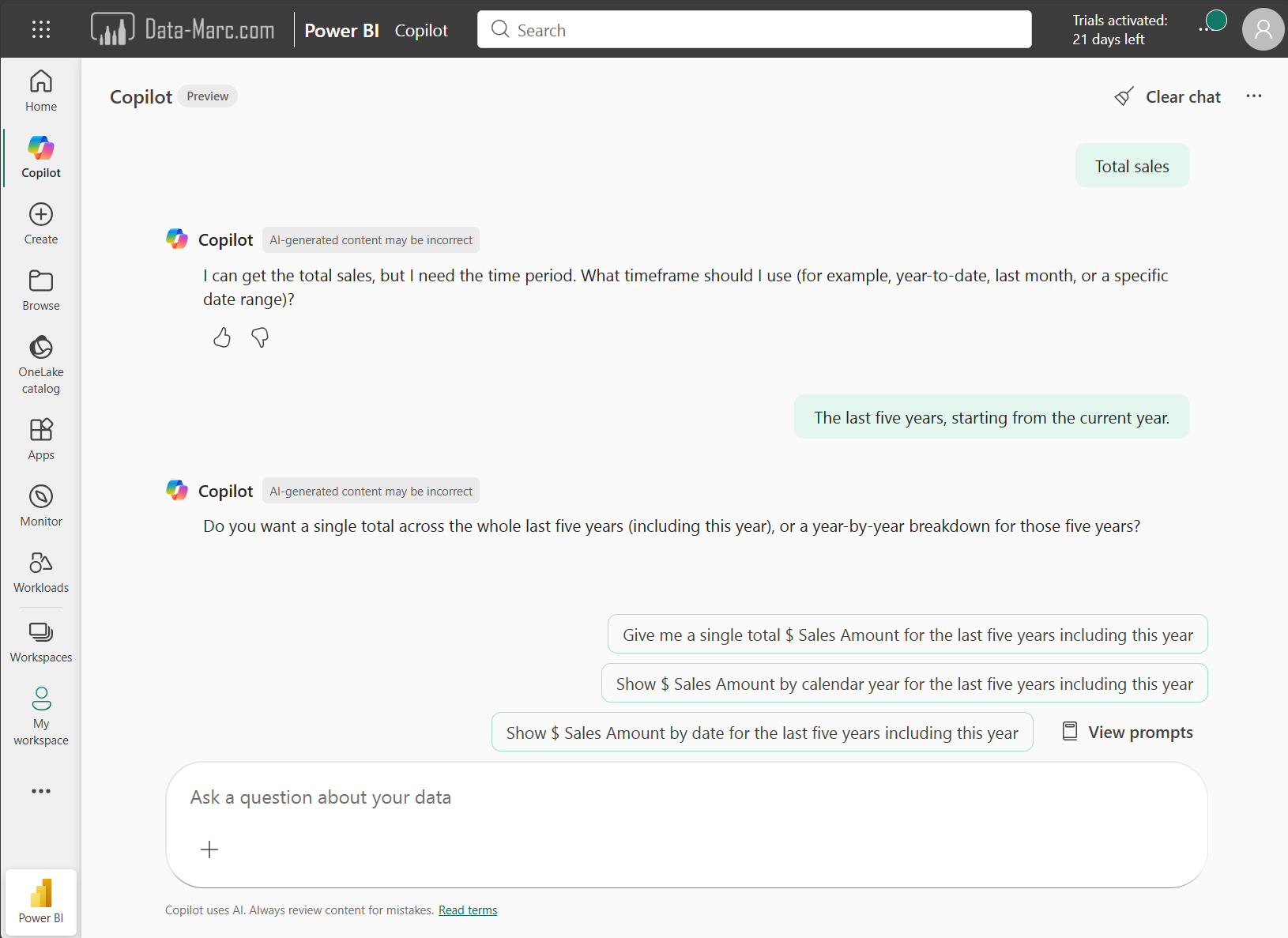
Fair enough you may think. It looks fool-proof. But I have to tell you the answers copilot returns are clearly not! I’ve chosen one of the suggestions from copilot “Show $ Sales Amount by calendar year for the last five years, including this year”. As it explicitly says, including this year, I either an answer where the year 2026 is included (even if there is no sales reported, it should return a blank), or return me no answer and tell me that there is no data available for the timeframe I’ve requested. Reality is, copilot comes back with the very same answer as we have seen before.
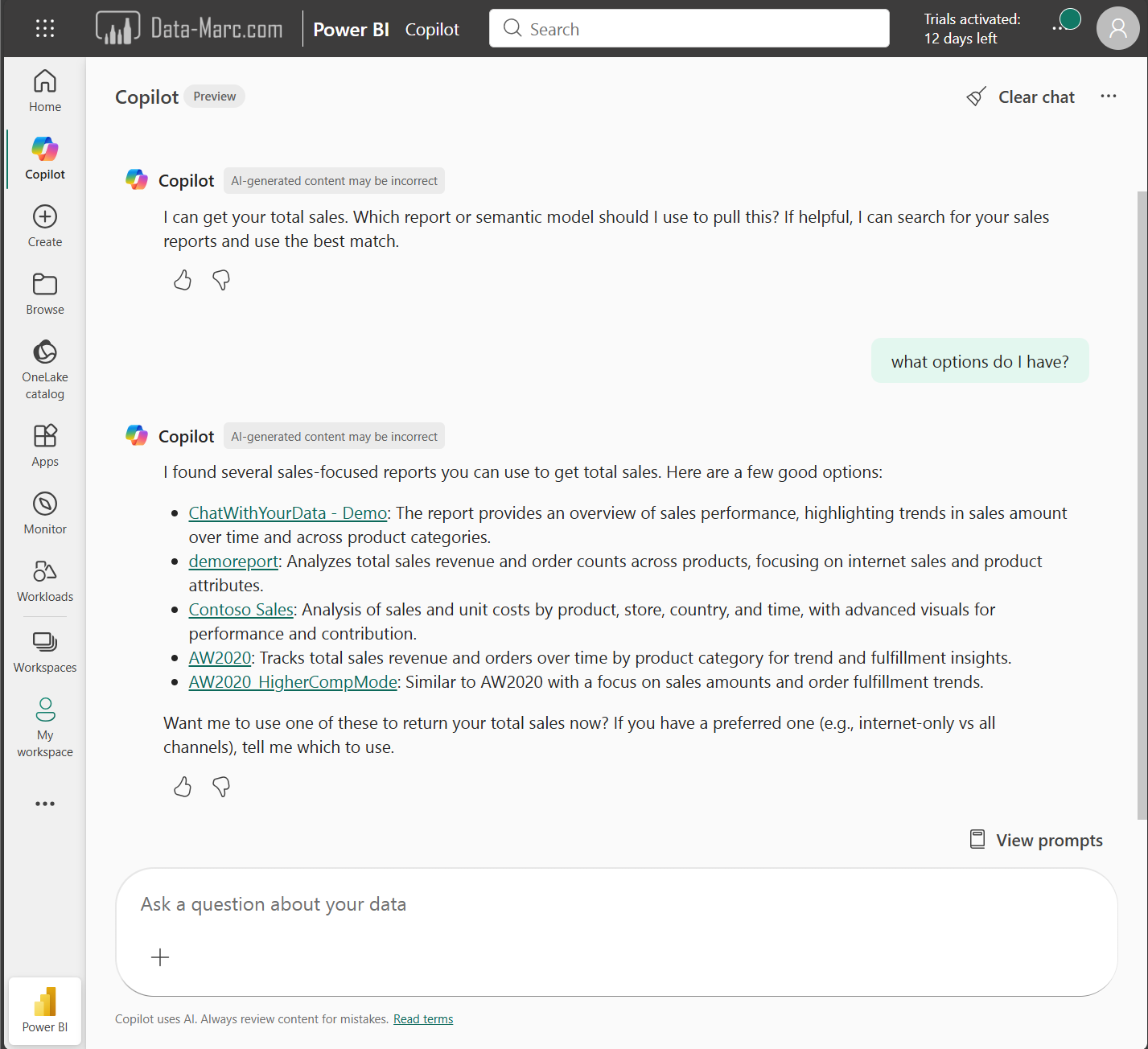
Also, we can conclude the conversation with Copilot is never consistent. A few days later, I asked the same question for “Total Sales” and now got a list of options to choose from before getting an answer. This prompt started pretty basic by just saying “Total sales”. I added context to the conversation by answering the questions from copilot, similar to adding context to you google search to find the relevant answers. The experience you have may vary from mine, depending on settings and governance applied. And that’s exactly what we need to talk about.
Awareness training
Probably every thinks right now… boring! Yet again someone talking about some mandatory training. I don’t have time for this nonsense. Just provide us the AI tools to get started. Many customers I talked to, only a few of them had set a proper policies and guidance around the usage of AI. Interestingly enough, the larger companies didn’t have any policies, where the smaller ones were strict.
Organizations tend to struggle with AI, what they should allow and what not. Let alone adopting all these new AI technologies in a governed way. Only very few organizations provided AI awareness training for their employees before they were allowed to start using Copilot or other AI tools for their day-to-day work. And in all fairness, I think providing those mandatory AI awareness training programs, is the only right thing to do.
It is not only about how to write a decent prompt, but also how to assess the outcome of an AI tool. What to use it for, and what not. But also, which data is allowed to be used in which AI tool, and which one is not. Imagine your employees running your sensitive corporate data through ChatGPT free plan. All data processed in the free plan of ChatGPT can be used for training purposes. That is where the security and compliance department of your organization should come in and assess which tools can be used, under which conditions and for what.
When something online is free, you’re not the customer, you’re the product!
Jonathan Zittrain
In all fairness, running your companies’ sensitive data through a free AI model, is in fact a data leak. In the Netherlands, where I live, companies are obliged to report data leaks, assess impact and inform all who are affected. I think since the advent of AI, there have been many more data leaks, but I wonder if everyone is aware of them, let alone whether they are reported.
Nobody wants this to happen, so better make sure the users are well aware of what they are doing, the risks and responsibilities that come with it. Some guidance and awareness training is of great help to get started. Only once the training is completed, the users can be onboarded to a security group to make use of the AI tools.
The foundation of trust
Back to the technology, back to Fabric and Power BI. Asking questions to any AI agent without assessing quality and source of the outcome is very dangerous. Can I trust the semantic model or lakehouse that was used to generate the answer? Is the query executed accurate and according to the defined business rules? Is the data in the source accurate and up to date? And many more questions you should ask yourself!
Copilot provides reasoning over the answer. Context such as which semantic model was used to generate the answer and which query was executed to calculate it or which verified answer is presented to you. All very important that helps users to understand better what they are looking at. But that is not all. Organizations should invest time in creating a foundation of trust. Implement those features which may have felt useless to you over the past years, they start making sense today! There are many features available which will help users to assess the quality of answers. Think about endorsement, sensitivity labeling, domains and more!
Sensitivity labels
Sensitivity labels are no longer just a security or compliance feature. In an AI driven world, they help users understand what kind of data an answer is based on. When Copilot gives an answer, users should be able to see whether that answer comes from public, internal, or confidential data. That context matters. It answers questions like:
- Can I share this insight with others
- Is this safe to use in a presentation
- Should I be careful acting on this information
When sensitivity labels are applied consistently to lakehouses, semantic models, reports, or any other data artifact that information becomes visible at the moment it matters. Not hidden in documentation only accessible to data governance organizations, but right there when users consume the answer.
Sensitivity labels also travel with the data and can automatically be inherited to related artifacts. If an answer is based on confidential information, that context stays attached. This reduces the risk of data being shared in the wrong way and increases confidence that governance still applies, even when AI is involved.
Simply put, sensitivity labels help users understand how careful they need to be with an answer.
Endorsement
In Fabric and Power BI, endorsement shows whether content is approved (certified) or self-glorification (promoted). In itself these are just labels that can be attached to artifacts. But a proper process around endorsement helps users to assess the trust in the data. Certification can be limited by a security group, where certain quality checks can be implemented. There is also the endorsement label promoted, which cannot be limited and every user can promote their own content, as I see it self-glorification. Typically, promoted content could be any self-service craftwork (with all due respect). On the other hand, a certified semantic model could tell users that:
- Business rules are defined and agreed
- The data is owned by a responsible team
- Definitions are consistent across reports
- Data is regularly refreshed
- The semantic model (or another artifact) is prepared to be used by AI (more about that later)
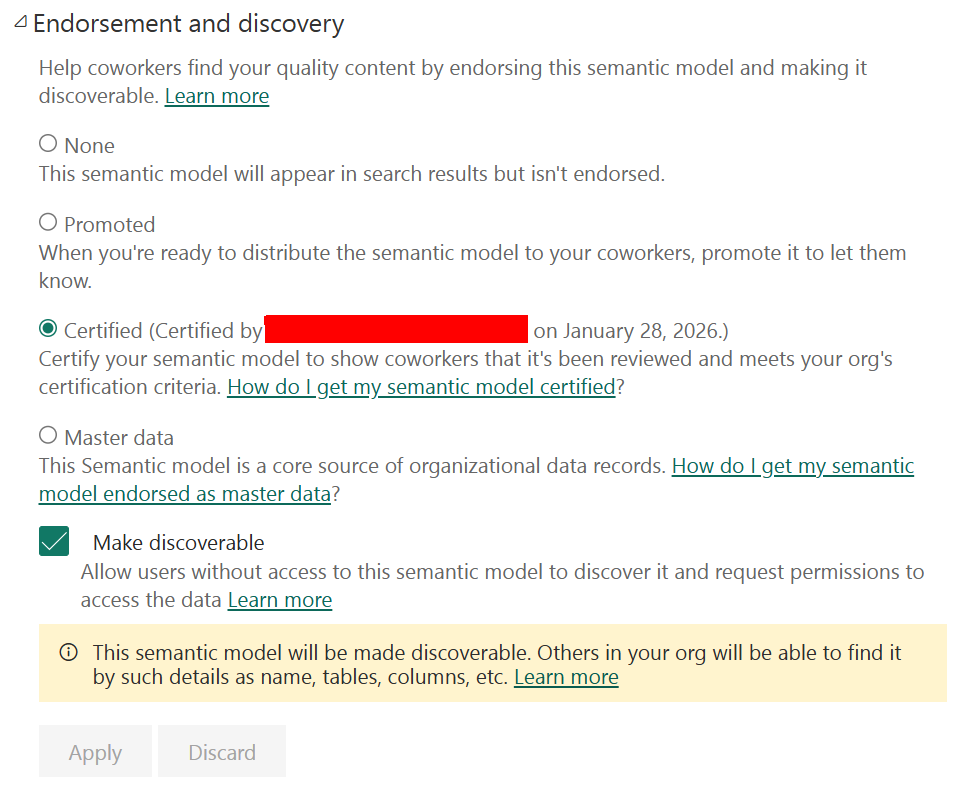
There are no build-in processes to check these measures on a semantic model that is marked as certified. Implementing certain controls in your organization is something that you have to do yourself, next to the process to follow for certification.
When Copilot uses a certified semantic model, the answer carries more weight. Users know this is the organization’s version of the truth, not an experiment or personal dataset. Showing endorsement together with Copilot answers helps users decide quickly:
- Can I trust this answer
- Can I act on it
- Do I need to double check this
Prepare data for AI
Next to governance features like endorsement and sensitivity labeling, organizations need to invest time in preparing data for AI. AI does not magically fix bad data. It exposes it. If the underlying data is unclear, incomplete, or inconsistent, Copilot will still produce an answer. It may even sound confident. But the outcome will be unreliable.
In the perspective of a semantic model, Power BI offers a feature “prep data for AI” which allows content creators to limit what can be used by AI, adding context, example questions and much more. But what are the things you should care about?
- Use user friendly naming for tables, columns, and measures. Avoid technical terms, abbreviations, and internal codes that only developers understand.
- Add clear descriptions to tables, columns, and measures so both users and AI understand what the data represents and how it should be used.
- Ensure clear data lineage so it is always traceable where the data comes from, how it is transformed, and which sources are involved.
- Validate business definitions and make sure there is only one meaning for key metrics like revenue, margin, or active customers.
- Remove or hide technical fields that are not meant to be used in analysis or questions, such as surrogate keys or audit columns.
- Organize measures logically using display folders or grouping so related metrics are easy to find and interpret.
- Confirm correct data types and formats, especially for dates, numbers, and currencies, to avoid wrong interpretations in answers.
- Review relationships and model structure to ensure tables are connected in a clear and expected way.
- Limit duplication of metrics across different models or reports to prevent conflicting answers.
And these best practices do not only apply to semantic models. They apply just as much to SQL endpoints, views, lakehouse tables, and any other data artifact that can be consumed by end users, with or without the help of AI. In reality, none of this is new. These are the same practices that should already be in place before data is exposed for self-service. Clear naming, clear definitions, traceable origins, and clear ownership have always mattered. The reason they were often skipped is simple. They cost time. The impact of not doing them was limited. A confusing column name might lead to a wrong report, a misunderstood metric, or an extra meeting to clarify things. Annoying, but manageable. The harm stayed small and local.
With AI, every weakness in your data estate is amplified. Unclear definitions turn into confident but wrong answers. Poor naming leads to misunderstood questions. Missing context spreads confusion faster than ever before. The damage is no longer hidden in a single report, it shows up directly in conversations and decisions. What used to be optional groundwork is now a requirement. The same best practices, applied consistently across all data artifacts, form the foundation that AI builds on. If that foundation is weak, trust disappears quickly. If it is strong, AI becomes a powerful accelerator instead of a risk.
Approved for copilot
The actual preparing for AI is one thing, Fabric also includes a feature to flag an object as such. Semantic model owner can mark their semantic model as approved for copilot. Once enabled, you are explicitly telling Copilot that this model is safe to use without extra warnings or restrictions. When a semantic model is marked as approved for Copilot, the Copilot on home experience no longer applies friction to answers coming from that semantic model. In other words, Copilot treats answers based on this model as trusted. Any reports that use the same semantic model automatically inherit this status and are also considered approved for Copilot.
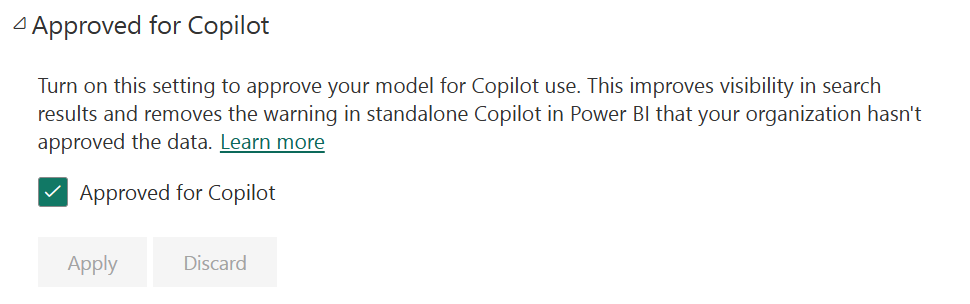
It is worth noting that approval currently only applies to semantic models. Reports, dashboards, and apps cannot be marked as approved directly. This again emphasizes the importance of getting the model right. In the end, the reports and dashboards only show whatever is in the semantic model. So that one should be right!
The setting to limit copilot to only use items that are marked as approved for copilot draws a hard line between data that is ready for decision making and data that is still exploratory, experimental, or incomplete. It introduces another control next to endorsement and sensitivity labeling to control what data can be used by copilot. What users see in Copilot, is what the organization stands behind. This is especially important in a self-service environment. Many users do not know which dataset is official and which one was created for a quick analysis.
By limiting Copilot to approved items only, administrators shift responsibility to where it belongs. Data teams decide what is ready. Users can focus on asking questions instead of validating sources. Trust becomes the default, not something users have to guess.
Lack of controls for the admin
There is a problem though. Administrators cannot limit who is allowed to flag a data product as approved for copilot. Every semantic model owner can do this. This means we’re back to square one, self-glorification, similar to what happens with the promoted endorsement label.
Administrators require more controls. They need to be able to;
- Control through a security group which users can mark a semantic model as prepared for copilot
- Introduce approval processes around it, through quality control tools organizations already have
- API controls to list all items marked as approved for copilot
- API controls to flag/unflag semantic models as approved for copilot
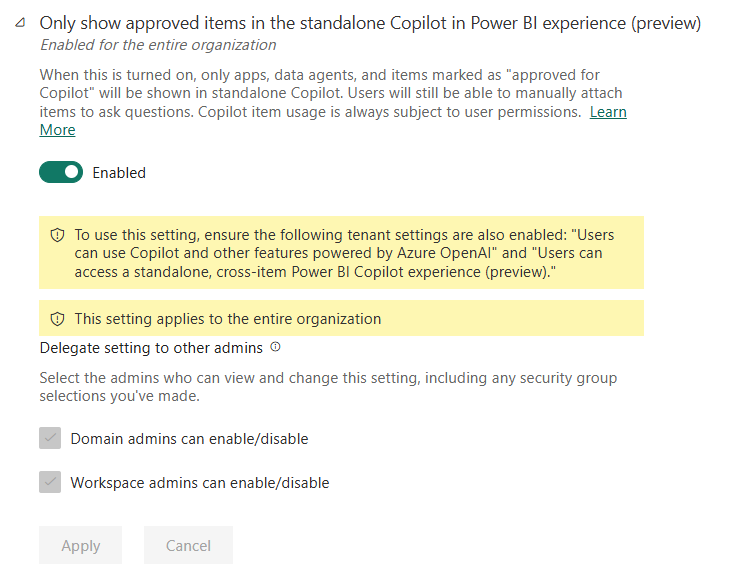
Even with these shortcomings, the fact that a tenant setting exists to stop every semantic model from showing up in Copilot is a great step forward. This admin tenant switch is still marked in preview, so let’s keep our fingers crossed the requested enhancements will be added in the future.
Wrap-up
Copilot can feel magical when it works. But that magic only appears on a solid foundation. Without context, it guesses. Without trust, those guesses can mislead. The reality is simple: Copilot does not create trust, it amplifies whatever foundation you already have. Clear definitions, well-prepared semantic models, proper governance, sensitivity labels, endorsement, user training, and thoughtful data preparation are essential if you want reliable answers. These features are not just extra settings. They guide Copilot to the right data, show users what can be trusted, and prevent confusion before it happens.
Investing in context and trust may feel slow, and employees may want faster results. But the payoff is immediate. Features like Prepare data for AI and marking a model as Approved for Copilot make sure AI only uses curated, reliable datasets. Endorsement tells users which content is verified, and which is experimental. Sensitivity labels make it clear what data is safe to use. Tenant settings allow administrators to limit Copilot to approved items only. But it is not only about the features, but it is also about training users to use AI in the right way. Awareness training is crucial before your users get started. Together, these tools and training create an environment where users can ask questions with confidence and AI becomes a true accelerator instead of a source of risk.
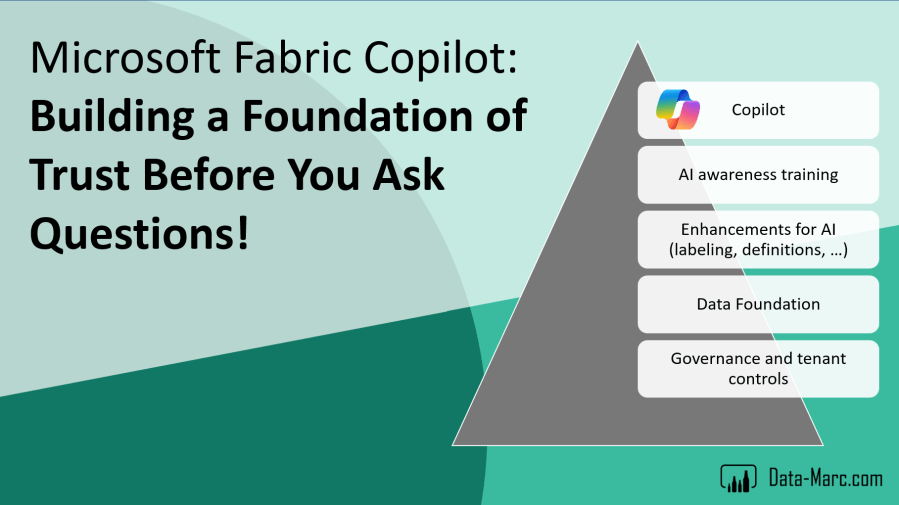
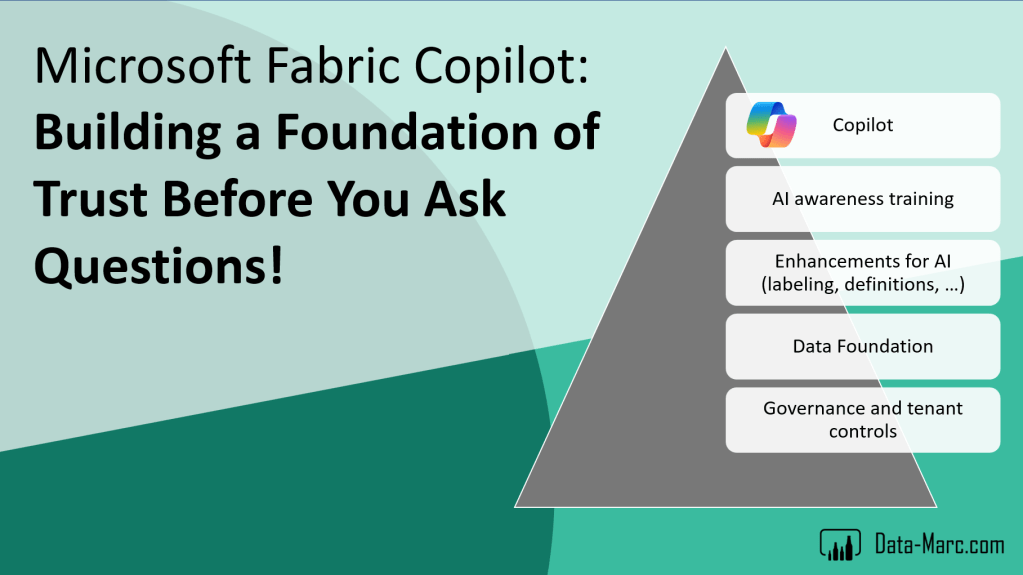
To sum up what we’ve covered in this blog, we can think of it as a pyramid, a foundation of trust that leads to Copilot being useful for your users. It starts with governance: setting the guidelines, defining the rules of engagement, and putting in place controls, policies, and labeling in Microsoft Purview. On top of that, your data platform takes shape, with mature and certified datasets ready to be used. The next layer are the AI enhancements: clear definitions, traceable lineage, and user-friendly naming and descriptions for all tables, columns, and measures. These elements make the data understandable and discoverable through tools like catalogues and Purview. The final layer is end-user training, helping people understand how to use AI responsibly, what to do, what not to do, and how to assess the results. Once all these layers are in place, you can confidently enable your users to start interacting with Copilot on a solid foundation of trust.
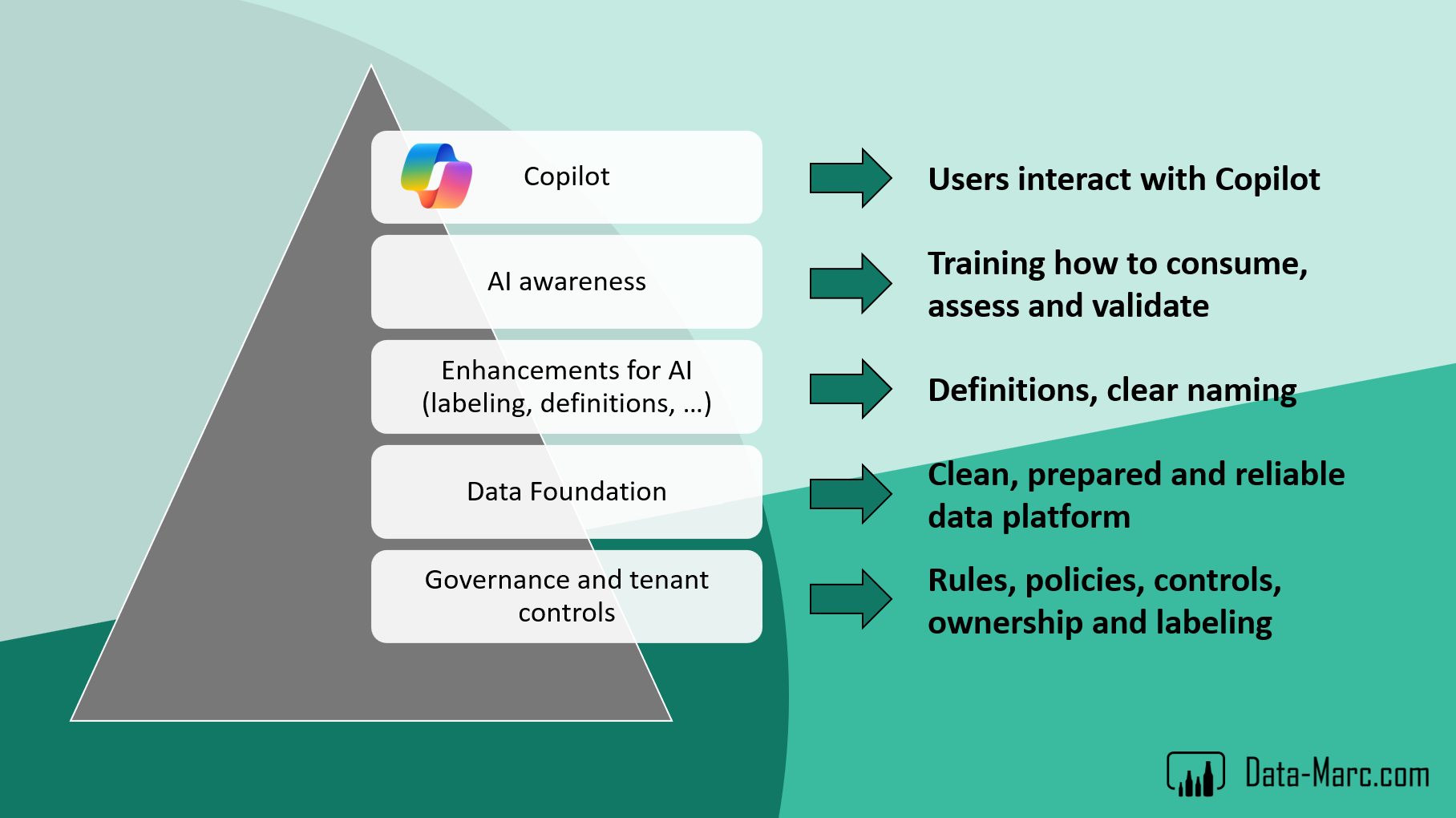
At the end of the day, the question is not whether Copilot can answer your questions. It is whether your data, your models, and your organization are ready to be trusted. That is what makes Copilot’s magic real.
 Data - Marc
Thank you, Marc! Your emphasis on making people more aware of how they can (and shouldn’t) trust responses is a very prudent one. Though, you’re right most organizations probably won’t want to hear it. Likely, we are going to see a whole lot of mistakes made before this kind of awareness is taken seriously. And there is still too much optimism that “the technology is still improving”, with the assumption that in a few short months it will become flawless and smarter than the user.
Love “Promoted” as “Self-Glorification” 😛
LikeLike