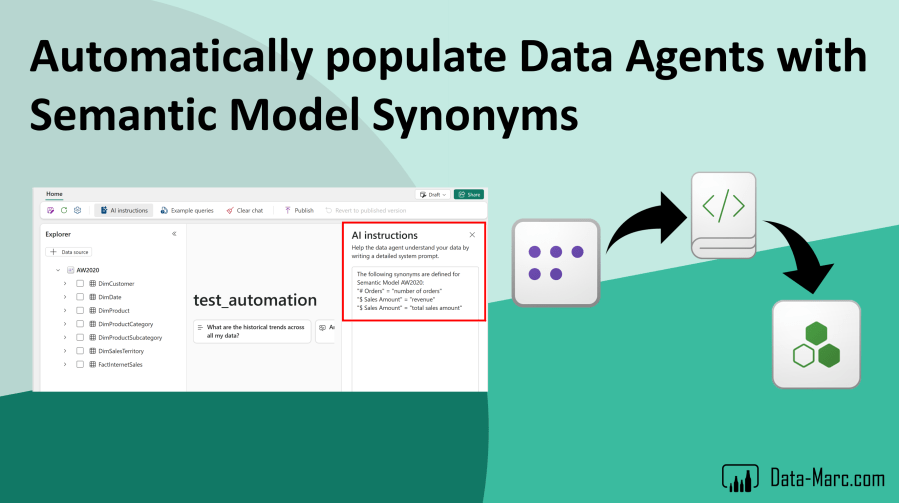
It was only yesterday, that I wrote a blog post on Semantic Models as a source for Fabric Data Agents. Not much time has passed, since I learned that Fabric Data Agents does not (always) respect the Synonyms that have been added to a Semantic Model. As a result, the Data Agent may start creating implicit measures, not respecting the definitions and logic in the explicit measures that are part of the Semantic Model.
Long story short, I think we should be able to do better! Therefore, I created a Notebook that helps you to setup Data Agents, collect additional information from your Semantic Model and populate that information automatically as AI notes to the Data Agent.

Update October 2025: Synonyms are now taken into account by the Data Agent. The prompts in the Data Agent will be processed in the Semantic Model engine which will respect all additions such as synonyms. Nevertheless, this blog still shows a valuable approach using the Data Agent SDK in combination with Semantic Link.
Data Agents and Semantic Model enrichments
Yesterday, I posted that the Semantic Models are the most valuable asset in your data estate to be used for Data Agents. Semantic Models are (mostly) put in perspective of the business users, using easy to understand terminology and avoiding technical setups like PascalCase or camelCase. Also, your business logic mostly lives in the Semantic Model, captured in DAX expressions. For each of these model objects, you may (or you should have) enriched the model with descriptions and synonyms.

However, it was only shortly after that I could no other than conclude that Data Agents do not use the synonyms that are added to the Semantic Model. The implicit measures generated by the Data Agent, may return different results then when you ask the very same question in Power BI Copilot directly, or using the good old Power BI Q&A visual.
By simply adding the synonyms to the AI notes for the Data Agent, which are captured on the right-hand side in the Data Agent editor, it will actually use that input to find the right measures in your Semantic Model.
But… there is light at the end!
Moving closer to a solution
As I’m rather lazy and efficient than doing the same work twice, I though there must be a way to get my synonyms automatically populated to the Data Agent’s AI notes, instead of me adding them manually in two places. Still, I agree the solution will be sub-optimal and I rather see the Data Agent respecting any enrichments of the Semantic Model, but at least it’s a way forward!
What I’ve done, is setting up a Notebook, which helps you to collect all the synonyms in your Semantic Model. These synonyms can be the suggested synonyms by the engine, as well as any manual renamed items in visual, but most useful the synonyms you’ve added to the model yourself!

In the Notebook, I’m focusing on collecting the synonyms that are added by the developer, by simply filtering to only the items that have a Las Modified time. Collection of all this information happens using Semantic Link Labs. With all the information, I’m building a text string that can be copy-pasted to an existing Data Agent or populated automatically as I’m doing in the next steps.

Next, I’m setting up a new Data Agent (defaults to the same workspace) to make sure I can populate the AI Notes with the text string with synonyms. To do so, I’m using the Data Agent SDK. The following actions are performed:
- Create a Fabric Data Agent
- Connect the Semantic Model as a source to the Data Agent
- Adds the text string with synonyms as AI notes to the Data Agent

The Notebook cell nicely outputs the configured instructions for the Data Agent. When we open the Data Agent, we see the information populated there as well.

Once the data source (Semantic Model) is connected to the Data Agent, no tables are selected yet. All though the SDK allows to directly link tables, I did not automate this, as I believe this is for the Data Analyst to decide which tables are relevant (like Field parameters, which appear as tables in a model). In that same light, some of the synonyms collected in earlier steps, may not be relevant to bring along to the Data Agent.
I hope this Notebook helps you making the response quality from Data Agents connected to Semantic Models at least a tiny bit better and in line with your expectation. I’ve uploaded the full Notebook to my GitHub repository for your reuse.
 Data - Marc
Pingback: Populating Microsoft Fabric Data Agents with Semantic Model Synonyms – Curated SQL