A long time ago, I blogged about Power BI governance with topics like feature implementation in a phased approach and why you should consider to disable export to Excel. In this blog, I want to continue the governance topic with another blog about why monitoring your tenant is important! This blog will also provide you an overview of the various monitoring options you have out of the box, no matter what your role is. No matter if you are the workspace-, capacity-, domain- or tenant administrator.
I encourage everyone, no matter if you are the service administrator or not, to go through this blog and look from various angles how monitoring can help. I think it can be relevant for any Fabric / Power BI user to see all capabilities it has to offer from a different angle and better understand possible restrictions that are set by your service administrator.
As admin I can just block certain features, right?
As Fabric and Power BI are essential parts of your Data Culture within your organization, everyone within your organization could be building their own insights and sharing with colleagues or even outside the organization (if you allow them to). Many organizations may directly put questions marks around all this freedom for users. However, I’m more on the other side. I rather have a lot of freedom for users to do whatever they want, whatever they need – than blocking them to do so. Cause in all cases, they will find a way around and still achieve their goal – but in a non-supported, non-governed and non-monitored way.
Let’s take a very simple example. I can block export to Excel as an administrator to avoid users exporting Power BI visuals to an Excel document. However, if somebody makes a screenshot of the report – or opens Excel mobile, which has a feature to convert a picture into a table – you’re completely lost as service administrator. This is exactly why I think administrators should be supporting the users to do things the right way – instead of blocking users to do certain things.
Better to allow in a controlled manner than to prohibit in an uncontrolled manner.
For me, this applies to all things Fabric and Power BI. It applies to being able to create workspaces, being able to export data to CSV or Excel, to any other topic basically. But in the end, if you decide to block certain features for good reasons, the most important factor is to create consensus with the user, so they understand and agree with not using that specific feature.
Creating that commitment, is an essential part and all starts with communicating to the users. Often, I experience that Service administrators are distanced from the actual users. In my opinion, this should be an essential part of running a Center of Excellence (or Competence Center if you will). The Service Administrator should be represented in that group and actively participating. The phased roll-out I blogged about earlier, is something that should be clear to all users – so they know exactly when newly announced features will become available for the majority in the organization. Basically, expectation management. As many have said before me, with great power – comes great responsibility. Make users aware of the features they are using, the risks that come with it and how they should be using it.
Importance of monitoring
Big brother is watching you! Or not? That’s often the very first response I hear when I start conversations about monitoring. Why are you tracking everything? Well, honestly the majority of organizations are already doing this for all you do with the company resources. Whether you open your mail, save a document in Microsoft365, open a link on SharePoint or anything else – this is all saved in the audit logs. Same applies for anything Power BI and Fabric.
In 99.9% of the cases, administrators don’t look at the audit logs in detail. They may only extract information on aggregated level to measure adoption and trends. And I would recommend every organization to do so. This is super important, not only to measure the overall adoption of your platform, but more importantly in the light of the point I mentioned above. Support people to do the right thing! If you figure out that more and more users start exporting data to Excel or CSV, this could be a trigger to organize a knowledge session in your CoE around usage of data outside of the platform and what options you have – like Analyze in Excel.
Auditing, compliancy and investigation purposes
Other than the adoption and educational driver, there are compliancy reasons to have this data available. This is solely for cases each and every organization hopes to never experience. What if you have a data leak, or someone’s account is hacked. At that point, the detailed information is crucial to figure out which items in your platform are touched and potentially leaked by the hack. Authorities where data leaks must be reported could ask for detailed analysis like this – especially when it involves personal information.
Also, information protection is an important aspect. What if someone shares a lot of information to external parties outside of your organization. This may be a feature that is enabled for your organization but can also be a data leak at the same time. Therefore, monitoring data that leaves your organization is a crucial aspect. Implementations of Microsoft Information Protection by using sensitivity labels can help to control this better – but again communication and commitment are essential drivers to implement this successfully.
It’s not only audit logs which are an important source of information. It is also the tenant settings and configuration which can be monitored. Especially with the delegation features in which capacity administrators can derive from the global tenant settings, it is important to be aware of this difference and be able to reason why they derive. The Fabric REST APIs will come in useful here, as there is an API which shows the tenant setting overrides by capacity. An important API, which in my opinion should be reported on in every organization which has delegated administrators – either on capacity or on domain level.
Other reasons and recommended resources
Although, adoption monitoring was already mentioned, I want to point out great content that is shared on the Fabric adoption roadmap around the topic of adoption tracking. This is an excellent resource that I would recommend everyone to read – without repeating all of that here.
Similarly, the adoption roadmap separates two topics around tenant level auditing and monitoring. I recommend checking out these articles as well. The latter also includes references to Information Protection, Defender and other Microsoft services which you may already have a license for in your organization. These are key features that help you and your organization to have a healthy, well governed and monitored Fabric tenant.
Where can I start monitoring for my role?
All these reasons for monitoring are fine, but where do you start? Well – it depends! It all starts with who are you, what is your role and what do you want to achieve?
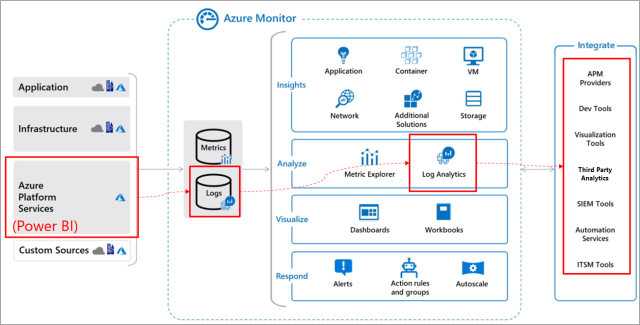
I’m a Workspace Administrator In my previous post I explained how you can gain insights in your own workspace. In that post I explained it in context of external connections to your semantic model, however the same concept can be used. You can start spinning up a Log Analytics workspace to gain insights in usage across all your semantic models in the workspace. Keep in mind though, this is limited to semantic models (Power BI workload) and will not cover anything of the other Fabric artifacts. Therefore, limited scope.
I’m a Capacity Administrator If you’re admin of a capacity – all you can do is start using the Fabric Capacity Metrics App. This will provide you insights in the utilization of your capacity. You can drill down in this report to individuals consuming your capacity and the queries they’ve executed on your capacity. This does include all workloads running on your capacity. The level of logging on query level is more detailed than what audit logs will provide, as that’s on more granular level based on the action a user executed but doesn’t give any query context.
I’m a Domain Administrator As domain administrator, you can now also setup delegated tenant settings, just like with capacities. Microsoft recently announced this. At the time of writing this blog (October 2024) the delegated scope is limited to the export settings. When it comes to monitoring, there is not much you can do out of the box. If you’re lucky, your tenant administrator may provide you with more detailed insights – but this has to be a custom solution setup within the organization.
I’m a Tenant (service) Administrator In this last role, you have all access to anything on the tenant. You can monitor everything you think is necessary. There are multiple options where you can start.
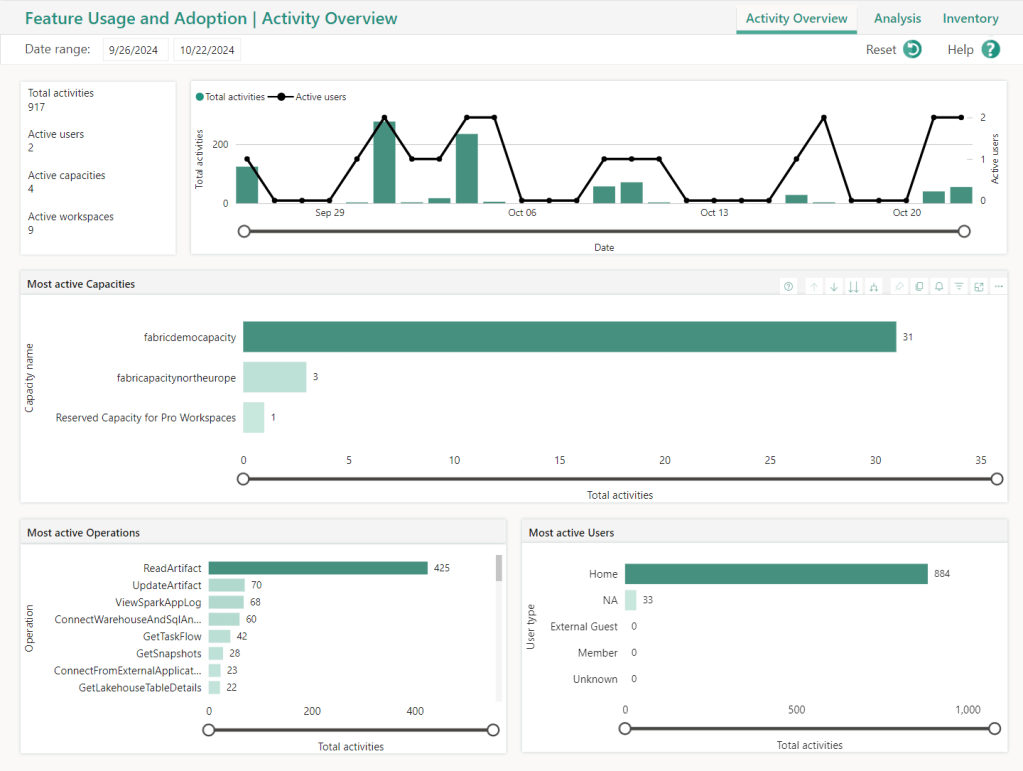
Admin Monitoring workspace provides a comprehensive overview for feature usage and adoption monitoring. This is an automatically deployed workspace with reports that provide you insights in what is happening across your tenant and fetches data from the Audit Logs, combined with several overall insights like number of capacities, active vs inactive users etcetera. For every administrator this is a great start to explore what is happening in your tenant.
Compliance portal (part of Purview) will provide you insights in all audit logs. This includes a search capability for ad hoc analysis. You can find this portal by either going directly to purview.microsoft.com/audit/auditsearch or alternatively navigate via the Fabric Admin portal and click Audit Logs.
Capacity Metrics App will provide you insights in all that happens on an individual capacity. Given you are the tenant admin, you can also access all the capacities and spin up the default report.
Workspace Log Analytics can be configured if you’re granted access to the workspace. There is no tenant-level option for this integration, you have to go through each individual workspace with appropriate permissions (workspace admin).
The important sidenote
Though, there is a big side note that has to be made to all that involved Audit Logs. Microsoft only keeps you Audit Logs for a limited amount of time. The maximum supported date range is 90 days. This basically means that long term analysis will not be possible beyond the scope of these 90 days. However, setting up a custom solution will help you to proceed here.
There are several options that you could consider to start collecting the data and save it for long term. For example, you can start using the Fabric / Power BI Admin APIs which allow you to pull all data from the Audit Logs and save it in your preferred location.
The privacy aspect
If you extract logs, in any sort, no matter which of the above monitoring options you pick, you should 100% be aware that you are collecting information which tells something about employee behavior at a given moment in time. Therefore, I would highly encourage everyone to be very sensitive with this data and not share it in an open dataset across the organization. I’ve seen this happening at a customer – which has led to many questions and concerns from employees about their privacy.
I highly encourage every administrator, or every custom solution created to properly document and communicate about the reasoning of this data collection. Combined with that, make sure you setup data retention to still delete certain data when time goes by or at the very minimum make sure you aggregate the data to exclude all aspects which can relate back to individuals.
Wrap up
As Tenant Admin, should I block the majority of features? I doubt if you should… users are driven to reach their goal. Therefore, they will find a way around in any situation. I would encourage every administrator out there to be more facilitating to the users, rather than acting like the police and telling everyone what they should do and what not.
Also, I hope I emphasized enough that monitoring is a must do! It will help various purposes like providing proper training and guidance, on to compliance and auditing purposes. In the end even for disaster investigation in case of hacks or data leaks – let’s hope that is never necessary! Custom solutions might be required to achieve your goals of monitoring, but the platform offers a wealth of options to get your started.
Depending on your role and scope of control, pick the monitoring options that are available to you to gain more insights and drive adoption, next to that telemetry is a great source for solution improvement! But above all, don’t forget to think about the purpose of monitoring and make sure you document and communicate about it. Don’t be like big brother – but do it with a purpose which is clear and understandable for all.




 Data - Marc
Pingback: The Importance of Monitoring in Microsoft Fabric – Curated SQL